
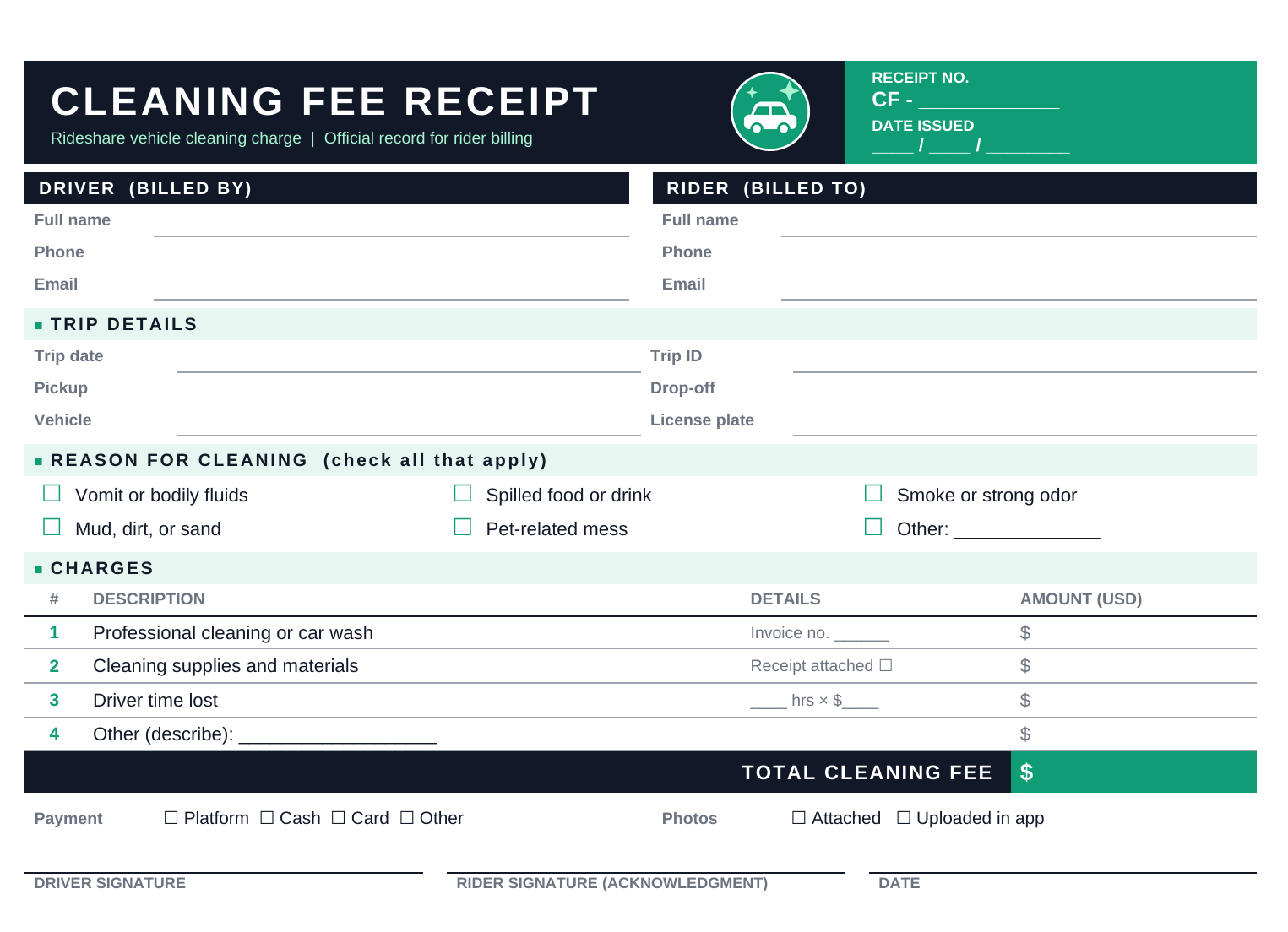
Our free Uber cleaning fee receipt template gives you a clean, ready-to-print form you can fill out in under two minutes.
Download Uber Cleaning Fee Receipt Template
Disclaimer: This template is provided for general record-keeping purposes. It is not legal or financial advice and is not affiliated with Uber Technologies, Inc.
What Is an Uber Cleaning Fee Receipt Template?
An Uber cleaning fee receipt template is a pre-formatted document that records a charge for cleaning a rideshare vehicle after a passenger causes a mess. It captures who was involved, what happened, what it cost, and who agreed to it.
Drivers use it when a ride leaves behind vomit, spilled drinks, food, mud, smoke odor, or pet-related messes. Riders and small fleet managers use it too, as a clear paper trail of what was charged and why.
Why a template helps:
- Documentation. A written record supports your claim if the charge is ever questioned.
- Consistency. You collect the same details every time, so nothing gets missed.
- Professionalism. A tidy receipt shows the charge is legitimate and itemized.
- Speed. You fill in blanks instead of writing everything from scratch.
What Is Included in an Uber Cleaning Fee Receipt?
Each receipt on the page has these sections.
1. Receipt number and date. A unique number and issue date make each receipt easy to find later.
2. Driver (billed by). Full name, phone, and email of the person issuing the charge.
3. Rider (billed to). Full name, phone, and email of the passenger being billed.
4. Trip details. Trip date, trip ID, pickup and drop-off locations, vehicle make and model, and license plate. These details tie the receipt to a specific ride.
5. Reason for cleaning. Checkboxes for the most common situations:
- Vomit or bodily fluids
- Spilled food or drink
- Smoke or strong odor
- Mud, dirt, or sand
- Pet-related mess
- Other (with a blank to describe it)
6. Itemized charges. Four line items with amounts:
- Professional cleaning or car wash
- Cleaning supplies and materials
- Driver time lost (hours and hourly rate)
- Other costs
A highlighted total sits at the bottom.
7. Payment and photo evidence. Tick how the fee was handled and whether photos were attached or uploaded in the app.
8. Signatures and date. Space for both driver and rider to sign, which confirms both sides have seen the charge.
How to Use the Uber Cleaning Fee Receipt Template
Step 1: Document the mess right away. Take clear photos before you clean anything. Capture wide shots and close-ups, and include the date and time if your phone allows.
Step 2: Report the issue in the app. Follow Uber’s current process for reporting a cleaning issue promptly, since time limits can apply. Check the Uber Help Center for the latest steps.
Step 3: Fill in the receipt. Add the driver and rider details, then the trip date, trip ID, pickup, drop-off, and vehicle information.
Step 4: Check the reason. Tick every box that applies. Use the “Other” line for anything unusual.
Step 5: Itemize the costs. Enter what you actually paid or lost. Attach your car wash invoice or supply receipts and tick “Receipt attached.”
Step 6: Total the charges. Add the line items and write the total in the highlighted box.
Step 7: Sign and date. Sign your copy. If the rider is present or reachable, ask for an acknowledgment signature.
Step 8: Keep records. Store your copy with the photos, invoices, and a screenshot of your app report. Keep them for at least a year, and longer for tax purposes
FAQs
Is this template an official Uber document?
No. It is an independent, third-party template and is not affiliated with or endorsed by Uber. It works as a personal record alongside the app’s own reporting process.
Does having this receipt guarantee I will be paid?
No. Uber reviews each cleaning claim under its own policy. The receipt is supporting documentation only.
How much is a typical Uber cleaning fee?
Amounts vary by the type and severity of the mess and by the region. Check Uber’s current policy for the most accurate figures, since they change over time.
Can riders use this template too?
Yes. Riders can keep a signed copy as a record of what they were charged and why.
Can I edit the template?
Yes. It is a standard Word file, so you can change the text, add a logo, adjust colors, or add line items.