
Create a professional donation receipt with tax-deductible wording, multiple currencies and automatic receipt numbers. Download a small-format PDF free, no signup
Donation Receipt Generator
Enter the donation details, check the live preview, then download a small-format PDF receipt.
What is a donation receipt?
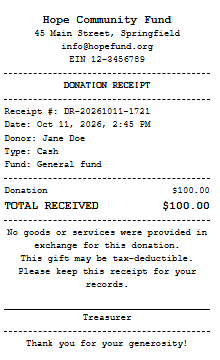
A donation receipt is a written acknowledgment that confirms an organization received a gift. It protects the donor, who may need it for a tax deduction, and it protects you by keeping your records consistent and auditable.
What should a donation receipt include?
A solid receipt contains:
- The organization’s legal name, address, and tax or charity registration number
- The donor’s name
- The donation amount (or a description of non-cash gifts)
- The date of the gift
- A unique receipt number
- A statement saying whether any goods or services were provided in return, and their value if so
- Tax-deductibility wording, where your organization is eligible
Rules differ by country. In the United States, for example, the IRS generally expects a written acknowledgment for gifts of $250 or more, and that acknowledgment must state whether the donor received anything in return. Always confirm requirements with your tax authority or accountant, since this page is not legal or tax advice.
How to create a donation receipt online
- Add your organization details: name, address, contact, and tax ID.
- Enter the donor and donation: donor name, amount, currency, type, and fund.
- Set the receipt number and date to automatic or manual.
- Choose tax-deductibility and enter any goods or services value.
- Click Download Receipt (PDF) above the preview, or print it directly.
When should you send a donation receipt?
Send it as soon as possible after each gift. Prompt receipts build trust, reduce questions at tax time, and give you a natural moment to thank the donor and invite them to give again. Many organizations also send an annual summary in addition to per-gift receipts.
Tips for better donation receipts
- Add a short, genuine thank-you message in the footer.
- Use sequential receipt numbers and never reuse one.
- Keep a PDF copy of every receipt, named by receipt number.
- Record the fund or campaign so reporting is easier later.
- Have an authorised person named on each receipt.
Who is this tool for?
Small charities and nonprofits, churches and mosques, school and club fundraisers, community groups, crowdfunding organizers, and event hosts who accept donations and need simple proof of payment without paying for donor-management software.
Responsible use
Use this tool only to document real donations that your organization actually received. Issuing receipts for gifts that did not happen, or inflating amounts so someone can claim a deduction, is fraud in most countries. Only mark a gift as tax-deductible if your organization is legally eligible to receive deductible gifts.
Summary
The Donation Receipt Generator is a specialized tool built for non-profits, NGOs, and community groups. It prioritizes compliance and trust by including required tax-deductible language and formal structural elements like signature lines and organization IDs. Built with a “privacy-first” approach, all data processing happens locally in the browser, ensuring donor financial data is never transmitted or stored on external servers.
Frequently Asked Questions (FAQs)
Is this donation receipt generator free?
Yes. Create and download as many receipts as you need, with no signup and no watermark.
Is this receipt legally valid for tax deductions?
While this tool provides the standard fields required for a tax-deductible receipt (Donor name, amount, date, and tax-exempt status), tax laws vary by country. Always ensure your organization is legally registered and that you sign the document to make it official.
Can I use this for “In-Kind” (non-cash) donations?
Yes. To do this, enter the estimated fair market value of the goods in the “Amount” field and describe the items donated in the “Purpose” field.
Why is there a QR code on the receipt?
The QR code acts as a digital fingerprint. It encodes the donor’s name, the amount, and your organization’s name. This helps donors and accountants quickly verify the data matches the physical document.
Does the tool save my donor’s contact list?
No. We designed this to be a “stateless” app. Once you close the tab or refresh the page, all entered data is wiped. This protects your donors’ privacy.