
Need to give a customer a clean, professional receipt in under a minute? Our QR code receipt generator lets you enter your business details, add items, apply tax, and download a small-format PDF receipt.
QR Code Receipt Generator
Fill in the details, check the live preview, then download a small-format PDF receipt.
What is a QR code receipt?
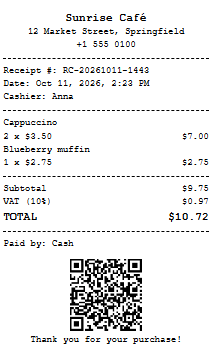
A QR code receipt is a standard sales receipt with a scannable code printed at the bottom. The code can point to anything you choose: a review page, a loyalty sign-up, your website, a payment reference, or a summary of the transaction itself. Customers scan it with their phone camera, so no app is required.
Why add a QR code to a receipt?
- Collect reviews. Link straight to your Google or Facebook review page while the purchase is fresh.
- Bring customers back. Point to a discount page, loyalty form, or online store.
- Make receipts easier to verify. Encode the receipt number, date, and total so you can match a paper copy to your records.
- Reduce paper. A QR code lets customers keep a digital reference instead of an extra printout.
How to create a qr code receipt online
- Enter your business details: name, address, and phone number.
- Choose your currency and set receipt number and date to automatic or manual.
- Add your items with quantity and unit price, and set your tax rate.
- Add a QR link and a footer message, such as “Thank you for your purchase!”
- Click Download Receipt (PDF) above the preview, or use Print for a thermal or office printer.
Features of this QR receipt generator
- Small-format PDF. The receipt is built at 80 mm wide, the standard thermal roll width, so it never stretches to a full A4 page.
- Multiple currencies. US dollars, British pounds, euros, Canadian and Australian dollars, Kenyan shillings, Nigerian naira, South African rand, Indian rupees, UAE dirham, and Japanese yen.
- Tax support. Set your own tax name (VAT, GST, Sales Tax) and rate. The receipt shows subtotal, tax, and total separately.
- Automatic or manual receipt numbers. Let the tool generate a unique number, or type your own to continue an existing sequence.
- Automatic or manual date and time. Use the current time, or enter a specific date for a sale you are recording later.
- Custom QR content. Paste any link or text, or leave it blank for an automatic receipt summary.
- Live preview. Every change appears instantly, with a Download button right above it.
Who is this qr code receipt maker for?
Small shops, market stalls, cafés, food trucks, freelancers, repair services, landlords collecting rent, and event organisers can all use it to issue a clear proof of payment without buying POS software.
Tips for a receipt that looks professional
- Keep the business name and address exactly as they appear on your official documents.
- Include a tax registration number in the footer if your local rules require one.
- Test the QR code with your phone before handing out receipts.
- Keep a copy of every PDF, named by receipt number, for bookkeeping.
- Use a unique, sequential receipt number for each sale so records stay easy to audit.
Important note on responsible use
This tool is built for genuine businesses and individuals to record real transactions. Only issue receipts for sales or payments that actually took place. Creating false receipts to claim refunds, expenses, or reimbursements is fraud in most countries.
Frequently asked questions
Is the QR code receipt generator free?
Yes. You can create and download as many receipts as you need, with no signup and no watermark.
Can I download the receipt as a PDF?
Yes. Press the Download Receipt button above the preview and a PDF is saved to your device.
What can the QR code contain?
A web link, plain text, or an automatic summary of the receipt number, date, and total.
Does it work on mobile?
Yes. The form and preview stack vertically on phones and tablets.
Is my data stored?
No. Everything you type stays in your browser and is not sent to a server.
Does the receipt include tax?
Yes. Enter a rate and the tool calculates the tax and total automatically, or set it to 0 for tax-free sales.
Start Generating Professional QR Receipts Today
Stop wasting time on manual receipt creation. Use our QR Code Receipt Generator to create fast, modern, and highly professional receipts for your business. Save time, elevate your customer experience, and generate printable receipts with integrated QR codes in just a few clicks.