
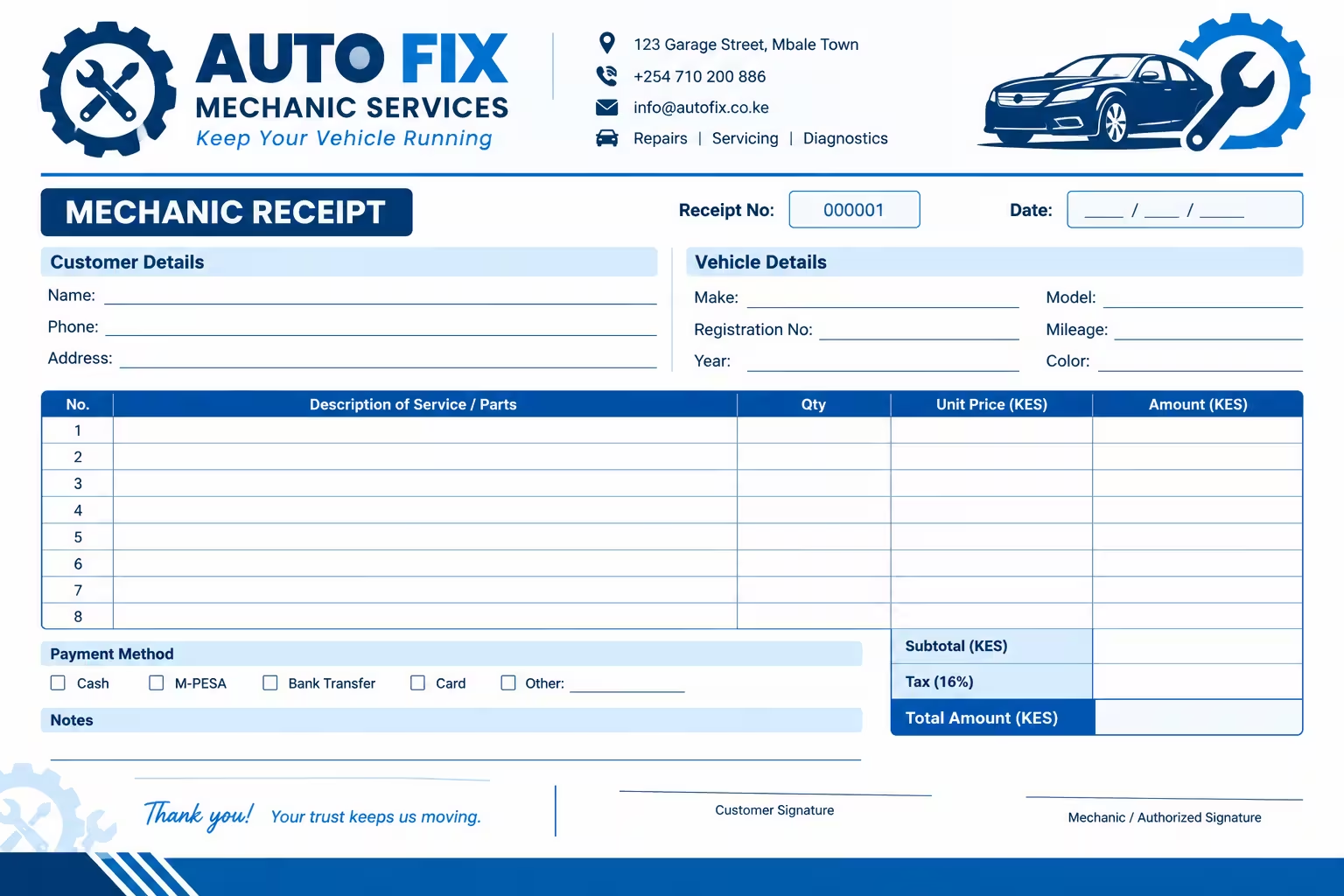
If you are looking for a Mechanic Receipt Template in Word, you are in the right place. Below, you can download our fully editable, professional mechanic invoice template for free.
Download Mechanic Receipt Template
What is a Mechanic Receipt?
A mechanic receipt (also known as an auto repair invoice or garage service bill) is a formal document provided to a customer after vehicle maintenance or repair services are completed. It serves as legal proof of payment and details the specific parts, labor, and taxes associated with the service.
Unlike a generic sales receipt, a mechanic receipt template in Word allows you to customize fields specific to the automotive industry, such as vehicle make/model, VIN (Vehicle Identification Number), mileage, and warranty information.
Mechanic Receipt Format
- Business Information: Your shop’s name, address, phone number, email, and logo. , Customer Details: Name, contact information, and billing address.
- Vehicle Information: Year, Make, Model, License Plate, and VIN.
- Service Date & Invoice Number: Crucial for tracking and sequential record-keeping.
- Itemized Breakdown: Separate lists for Parts (with part numbers if applicable) and Labor (with hourly rates and total hours).
- Taxes and Totals: Clear subtotals, applicable local taxes, and the final amount due/paid.
- Terms & Conditions: A brief note on your return policy, warranty on parts/labor, and payment methods accepted.
How to Use This Mechanic Receipt Template in Word
Our template is designed for maximum ease of use, even if you aren’t a Microsoft Word expert. Follow these simple steps:
- Download the File: Click the download button above to save the
.docxfile to your computer. - Open in Microsoft Word: Double-click the file. (It is also compatible with Google Docs, LibreOffice, and Apple Pages).
- Add Your Branding: Replace the placeholder text with your shop’s name and insert your logo at the top.
- Fill in the Details: For each job, simply type in the customer’s vehicle details, the services performed, and the costs.
- Save as PDF: Pro Tip: Before emailing or printing the receipt for your customer, go to
File > Save As > PDF. This prevents accidental edits and looks highly professional.
Frequently Asked Questions
Is this mechanic receipt template really free?
Yes, this Word template is 100% free to download and use for your personal or commercial auto repair business. There are no hidden fees or watermarks.
Can I use this template on a Mac or in Google Docs?
Absolutely. While it is formatted for Microsoft Word, you can easily upload the .docx file to Google Drive and open it in Google Docs, or open it in Apple Pages on a Mac.
Do I need a special license to issue a mechanic receipt?
No special license is required to issue a receipt. However, you must ensure your business is properly registered and that you are collecting and remitting the correct local sales tax on parts and labor, as required by your state or country.
Download Your Template Today
Don’t waste time creating a receipt from scratch. Download our Mechanic Receipt Template Word file today, customize it with your shop’s details, and start issuing professional, trustworthy invoices to your customers immediately.
Related Receipt templates