
A handyman invoice template is a pre-designed billing document you reuse for every job. It lists the work you did, the materials you supplied, the amount owed and how the customer should pay.
Download Free Handyman Invoice Template
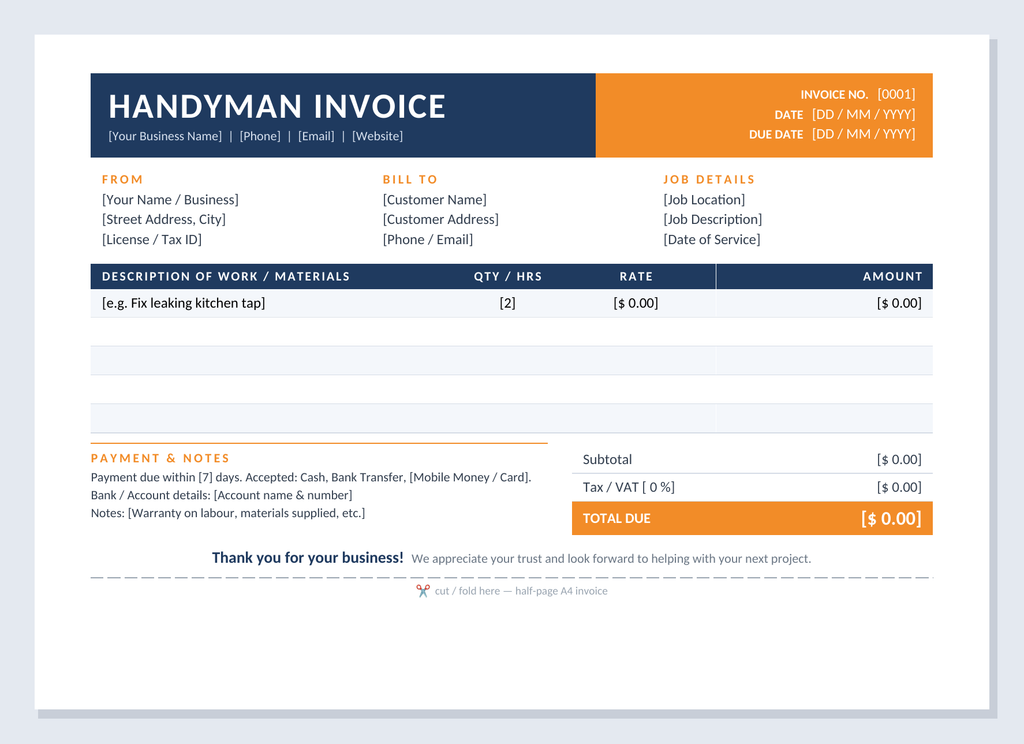
Use the file handyman-invoice-template attached below.
- Format: Microsoft Word (.docx). It also opens in Google Docs, LibreOffice and Word for mobile.
- Size: The invoice fills about half of an A4 page. Print it and cut along the dashed line, or email it as is.
- Editing: Click any bracketed field, such as [Customer Name], and type over it.
- Cost: Free for personal and business use.
How to use it:
- Open the file and replace the header details with your business name, phone, email and website.
- Enter a unique invoice number, the invoice date and the due date.
- Fill in the customer and job details.
- List each task or material with its quantity or hours and its rate, then write the line total in the Amount column.
- Add the subtotal, tax if it applies and the total due.
- Save as PDF to email, or print on A4 and hand it over.
What Is Included in the Template?
The design uses deep navy for authority and warm orange to draw the eye to the amount due. Here is what each section does.
Bold header band. “HANDYMAN INVOICE” is displayed clearly with your business name and contact details. The orange panel on the right holds the invoice number, date and due date, the first things a customer looks for.
From, Bill To and Job Details. Three columns give your business information, the customer’s details and the job location and date. Your license or tax ID has a place here too.
Itemized work table. Columns for description, quantity or hours, rate and amount cover labour and materials. Alternating light-blue rows keep it easy to read. There is room for five line items, which suits most handyman jobs.
Totals block. The subtotal and tax or VAT rate lead to a highlighted Total Due. The amount stands out so nobody has to hunt for it.
Payment and notes. Write your payment terms, such as “due within 7 days”, your accepted methods (cash, bank transfer, mobile money or card) and any warranty or materials notes. This section prevents the “I didn’t know how to pay” excuse.
Thank-you message and cut line. A friendly closing line leaves a good impression. The dashed line shows where to cut or fold the half-page invoice.
Tips for Getting Paid Faster
- Send the invoice the same day you finish the job.
- Keep your payment terms short and specific.
- Number invoices in sequence (0001, 0002 and so on) for easier bookkeeping.
- Itemize materials separately from labour so the charges are transparent.
- Keep a PDF copy of every invoice you send.
Summary
A handyman invoice template turns billing into a quick routine. This free, half-page Word template has a clean navy and orange design and every section a handyman needs: customer details, itemized work, totals, payment terms and notes. Download it, add your branding and send your next invoice with confidence.
Create clean, professional invoices in seconds with our powerful Invoice Generator