
What Is a Freelance Graphic Design Invoice Template?
A freelance graphic design invoice template is a pre-built billing document you reuse for every project. It records the services you delivered, the amount owed, the payment deadline and how the client should pay. You fill in the details instead of designing a new invoice each time.
For freelance designers, a good template does more than request money:
- It saves time. Spend minutes on billing and more hours on design work.
- It shows professionalism. A well-designed invoice reinforces your brand and builds client confidence.
- It prevents disputes. Listing deliverables, revision rounds and usage rights avoids “I thought that was included” conversations.
- It improves cash flow. Clear due dates and payment details help you get paid sooner.
- It simplifies bookkeeping. Numbered invoices make taxes and income tracking easier.
Download Freelance Graphic Design Invoice Template
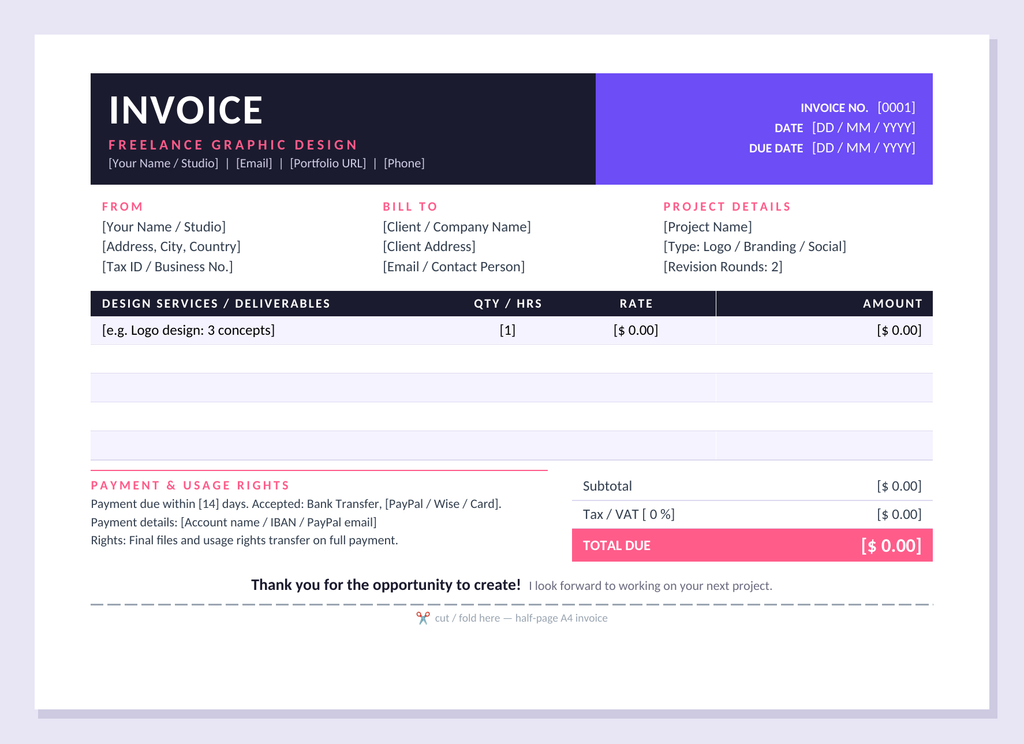
- Format: Microsoft Word (.docx). It also opens in Google Docs, LibreOffice and Word for mobile.
- Size: The invoice takes up about half of an A4 page, so it works for print and digital delivery.
- Editing: Click any bracketed field, such as [Project Name], and type over it.
- Cost: Free for personal and commercial use.
How to use it:
- Replace the header details with your name or studio, email, portfolio link and phone number.
- Add a unique invoice number, the issue date and the due date.
- Enter the client’s details and the project name, type and agreed revision rounds.
- List each service or deliverable, such as logo concepts, brand guidelines or social templates, with its quantity or hours and rate. Write the line total in the Amount column.
- Add the subtotal, tax if applicable and the total due.
- Add your payment details, then save as PDF and send.
Also see: Invoice Generator
What Is Included in the Template?
The design pairs a dark ink header with vibrant violet and coral accents, a look that suits a creative business without overwhelming the information.
Statement header. A bold “INVOICE” title, your “Freelance Graphic Design” tagline and your contact details sit on a dark band. The violet panel beside it holds the invoice number, date and due date.
From, Bill To and Project Details. Three columns cover your studio details, the client’s details and the project specifics, including project name, type and revision rounds. Recording the revision rounds on the invoice helps you set clear expectations.
Deliverables table. Columns for services or deliverables, quantity or hours, rate and amount handle both fixed-price and hourly work. Soft lavender rows keep it easy to scan. There is room for five line items.
Totals block. The subtotal and tax or VAT lines lead to a coral Total Due bar. It is the first thing the client sees.
Payment and usage rights. This space is built for designers. Add your payment terms, accepted methods such as bank transfer, PayPal or Wise, and a short rights statement. The sample line says final files and usage rights transfer on full payment, so edit it to match your contract.
Thank-you line and cut guide. A warm closing message leaves a positive final impression, and the dashed line marks where to cut or fold the half-page version.
Invoicing Tips for Freelance Designers
- Invoice a deposit, commonly 30 to 50 percent, before starting large projects.
- Reference the signed quote or contract in the project details.
- Itemize extras such as additional revisions or rush delivery.
- Release final source files only after payment clears.
- Send invoices promptly and keep a PDF copy of each one.
Summary
A freelance graphic design invoice template turns billing into a quick, professional routine. This free half-page Word template combines a stylish dark, violet and coral design with the sections designers need: client and project details, itemized deliverables, totals, payment instructions and usage rights.
Related: Free Handyman Invoice Template