Use this Restaurant Receipt Generator tool to create professional restaurant receipt in just a few seconds.
🍽️ Restaurant Receipt Generator
Restaurant
Order
Items
Charges
How To Use Restaurant Receipt Generator
To get started, begin by entering your restaurant name and address in the fields provided. These details will appear at the top of the receipt so your customers can easily identify your business.
Next, enter the customer’s name and receipt number. This helps you keep your records organized and gives the receipt a more professional look.
You can now add food items to the receipt. For each item:
- Enter the food or product name
- Add the quantity
- Enter the price
The tool will automatically calculate the total amount for each item based on the quantity and price you provide.
If you want to include VAT or tax on the receipt, simply leave the “Add Tax (VAT 16%)” option checked. If you do not want tax included, uncheck the box and the receipt will be generated without VAT calculations.
Need to add more items? Click the “Add Item” button to include additional foods or products on the bill. You can also remove any unwanted item using the remove button.
Once everything is ready, click the “Generate Receipt” button.
After confirming the details are correct, click the “Download Receipt” button to download and print the receipt for your customer.
If you are looking for an easy way to create restaurant bills online, this tool gives you a simple and professional solution without requiring software installation or technical skills.
What a professional restaurant receipt should include
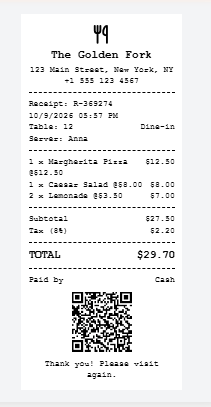
A complete restaurant receipt shows who sold what, when, for how much and how it was paid. Customers need those details for expense claims, and you need them for your own books.
| Field | Why it matters |
|---|---|
| Restaurant name, address, phone | Identifies the seller for refunds, claims and audits |
| Receipt number | Lets you find the sale again; keep numbers sequential |
| Date and time | Proves when the sale happened and supports daily reconciliation |
| Table, server, order type | Helps staff settle queries and match the bill to the order |
| Itemized lines (quantity, name, price) | A single total without items is rarely enough for expenses |
| Subtotal, discount, service charge | Shows how the total was built, line by line |
| Tax with rate | Makes sales tax or VAT visible and easy to file |
| Total and currency | The amount due, in the right currency |
| Payment method | Records cash, card or mobile payment |
| Footer message and QR code | Adds a thank-you, a link or a digital copy |
Who uses a restaurant receipt generator, and how to print 57mm receipts
Small food businesses benefit most, because they need a professional receipt but not a full POS subscription.
- Cafés and coffee shops that issue quick counter receipts.
- Food trucks and market stalls that print from a pocket thermal printer.
- Small restaurants, bars and bakeries that want a backup when the POS or internet is down.
- Caterers and home-based food sellers who send a PDF receipt after each order.
- Owners testing a layout before they buy a printer or choose POS software.
Tips for printing a 57mm thermal receipt
57 mm rolls are the standard size for most portable and mini thermal printers; countertop POS printers often use wider 80 mm rolls. These habits give sharper results:
- Print at actual size. In the print dialog, choose 100% or “actual size” and turn off “fit to page” so the receipt is not scaled.
- Set a custom paper size of 57 mm. The downloaded PDF already matches that width, so no margins are needed.
- Keep the text black on white. Thermal heads print one colour, so the receipt uses black text and avoids grey shades.
- Test one receipt first. Check that long item names wrap properly and the QR code scans before you print a batch.
- Store paper and receipts away from heat and sunlight. Thermal printing fades over time, so keep the PDF as your permanent copy.
- Save a PDF copy of every sale to match your records at the end of the day.
Frequently asked questions
How do I create a restaurant receipt online?
Enter your restaurant details, add each menu item with quantity and price, set tax, service and discount percentages, then click Download Receipt (PDF). The whole process takes about a minute.
Is this restaurant receipt generator free?
Yes. It is free to use, with no sign-up, no watermark and no download limit.
What size is the receipt?
The receipt is 57 mm wide, the common width for mini thermal printers, and the PDF page is cut to the receipt’s height instead of a full A4 sheet.
Can I add tax, a tip or a service charge?
Yes. Enter a tax percentage and a service percentage; use the service line for a service charge or a fixed tip percentage. You can also apply a discount percentage.
Can I change the currency?
Yes. Pick from US dollars, British pounds, euros, Kenyan shillings, Canadian and Australian dollars, Indian rupees, Nigerian naira, South African rand, UAE dirhams or Japanese yen.
Does the receipt have a QR code?
Yes. A QR code is added automatically and encodes the restaurant name, receipt number, date and total.
Can I set my own receipt number and date?
Yes. Receipt numbers and the date and time are generated automatically, and you can untick Auto to enter your own.
Can I use it instead of a POS system?
It works as a simple receipt maker or a backup, but it does not manage orders, inventory or sales reports. Choose a POS system if you need those.
Can I use these receipts for tax or expense records?
Use them only for genuine sales, and keep your original sales records as well. Requirements vary by country, so check with a local accountant.
Summary
This restaurant receipt generator creates a professional receipt with a QR code, tax, service charge, discount and 11 currencies, and it downloads as a PDF in one click. It is free, needs no sign-up and adds no watermark. Fill in your details, check the preview and download your receipt now.