
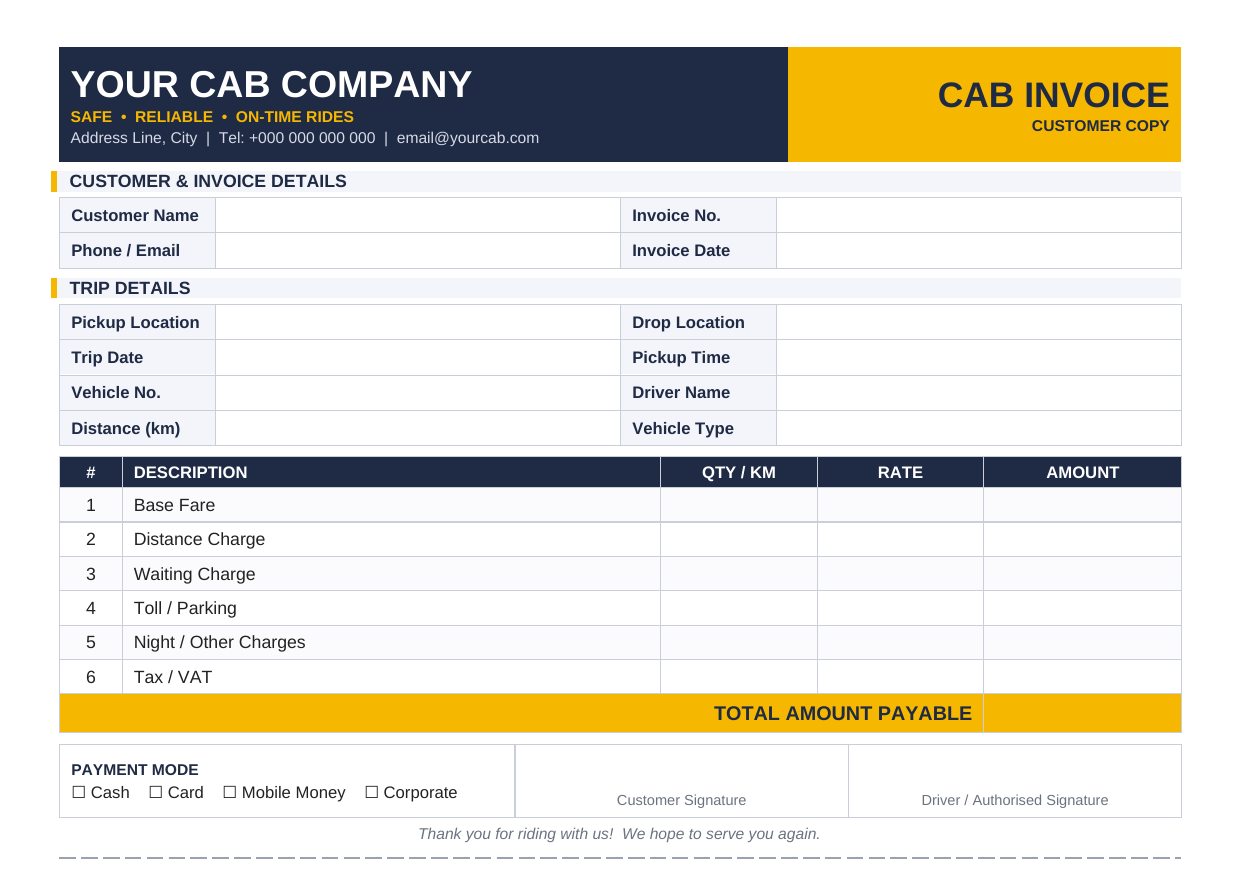
Looking for a cab invoice template you can download, edit, and use for taxi or cab transportation services? We have created a professional, editable cab invoice template in Microsoft Word (.DOCX) that you can customize with your business details, passenger information, trip details, fares, and payment terms.
Download Cab Invoice Template
The template is designed for cab drivers, taxi operators, private hire businesses, airport transfer services, and other transportation professionals providing passenger transportation services.
You can replace the blank fields with your own business information, customer details, trip information, services, prices, taxes, payment details, and payment terms.
The Word format makes the template easy to edit using Microsoft Word or compatible word-processing software. You can also add your company logo, change the currency, insert additional charges, and adjust the invoice to suit your business.
Generate Invoice
What Is a Cab Invoice?
A cab invoice is a document used to bill a customer for taxi, cab, or other passenger transportation services. It records important information about a journey, including the service provider, customer, pickup location, destination, date, fare, additional charges, and total amount due.
A cab invoice is particularly useful when the customer is not paying immediately after the journey. For example, a business may arrange regular transportation for employees and receive an invoice at the end of the week or month.
A detailed invoice can also help customers document transportation expenses for business reimbursement. Typical taxi and cab invoice formats include trip information, pickup and drop-off locations, mileage or duration, fare details, and the final amount due.
Unlike a simple cab receipt, which generally confirms that a payment has already been made, an invoice can request payment and include payment terms and a due date.
Who Can Use a Cab Invoice Template?
A cab invoice template can be useful for:
- Independent taxi and cab drivers
- Taxi companies
- Private hire operators
- Airport transfer businesses
- Chauffeur services
- Corporate transportation providers
- Hotel transportation services
- School and institutional transportation providers
- Long-distance cab services
- Businesses providing pre-booked passenger transportation
For drivers handling regular business customers, having a standardized invoice can make billing easier and provide customers with consistent documentation.
How to Use the Cab Invoice Template
Using the template is straightforward.
1. Download the Word template
Download the editable .DOCX file above and open it using Microsoft Word or another compatible word-processing application.
2. Add your business information
Enter your cab or transportation business name, address, telephone number, email address, and other relevant information.
You can also add your driver license number, cab number, vehicle registration number, or other identification information where appropriate.
3. Enter customer information
Add the customer’s name, company name, billing address, telephone number, and account or purchase-order reference if applicable.
For business customers, accurate billing information can make it easier for their accounting department to process the invoice.
4. Add trip details
Enter the date and time of the journey, pickup location, destination, trip or booking number, distance, duration, and driver or vehicle information.
Including the pickup and destination locations makes the invoice easier to understand and helps connect the charge to the actual transportation service.
5. Enter the fare breakdown
Use the itemized section to record the charges. Depending on your pricing model, these may include:
- Base fare
- Distance or mileage charge
- Waiting time
- Tolls
- Parking
- Airport surcharge
- Additional service charges
- Other applicable fees
Separating these charges provides greater transparency than simply entering one unexplained total.
6. Calculate the total
Enter the subtotal, applicable discounts, taxes or fees, and final amount due.
If you are required to charge tax, use the applicable rate and follow the tax requirements in your jurisdiction. For example, Kenyan VAT rules provide requirements concerning tax invoices issued by registered persons making taxable supplies.
7. Add payment information
Specify whether the customer has paid by cash, card, mobile money, bank transfer, or another payment method.
For account customers, include the payment due date and any applicable payment terms.
8. Save or print the completed invoice
Save a copy for your records and send the completed invoice to the customer. You can print the document or save it digitally as a PDF after completing it in Word.
What Is Included in the Cab Invoice Template?
Our cab invoice template includes the key sections needed to document a transportation service professionally.
Business and invoice information
The header provides space for:
- Business or driver name
- Business address
- Phone and email
- Invoice number
- Invoice date
- Due date
- Cab or license number
- Trip or booking number
Customer information
The template includes fields for the customer’s name, company, billing address, telephone number, and purchase-order or account reference.
Trip information
The trip section provides space for:
- Pickup date
- Pickup time
- Pickup location
- Destination
- Distance or duration
- Driver or vehicle information
These details are important because a transportation invoice should clearly identify the service being billed.
Fare breakdown
The itemized table allows you to list different charges separately. This makes it easier for the customer to understand how the total was calculated.
Payment information
You can indicate the payment method, payment status, and remaining balance.
Notes and payment terms
The template also provides space for payment due dates, cancellation policies, waiting-time terms, and additional notes.
Read: 10 Simple Accounting Software for Small Business
Frequently Asked Questions
What is a cab invoice template?
A cab invoice template is a pre-designed document that taxi and cab operators can use to bill customers for transportation services. It typically contains fields for business details, customer information, trip details, fare breakdowns, payment information, and the total amount due.
Can I edit the cab invoice template in Word?
Yes. The template provided on this page is an editable Microsoft Word .DOCX document. You can replace the blank fields with your own information and customize the document for your cab business.
What should a cab invoice include?
A cab invoice should generally include the service provider’s details, customer information, invoice number, invoice date, trip date, pickup location, destination, fare breakdown, additional charges, total amount, payment method, and payment terms where applicable.
Is a cab invoice the same as a taxi receipt?
No. An invoice generally requests payment, while a receipt confirms that payment has been received. A taxi receipt is commonly used as proof of a completed and paid ride.
Download Your Cab Invoice Template
Create professional transportation invoices without starting from a blank document. Download our editable cab invoice template in Word format, enter your business and trip information, customize the charges, and save or print the finished invoice.