
A Doctor’s Office Receipt Template is an editable financial document used by general practitioners, medical clinics, and private specialists to acknowledge payments received for healthcare services.
It provides patients with an official, itemized proof of payment for consultations, diagnostic tests, treatments, and prescriptions required for personal record-keeping or insurance claims.
Download Doctor’s Office Receipt Template
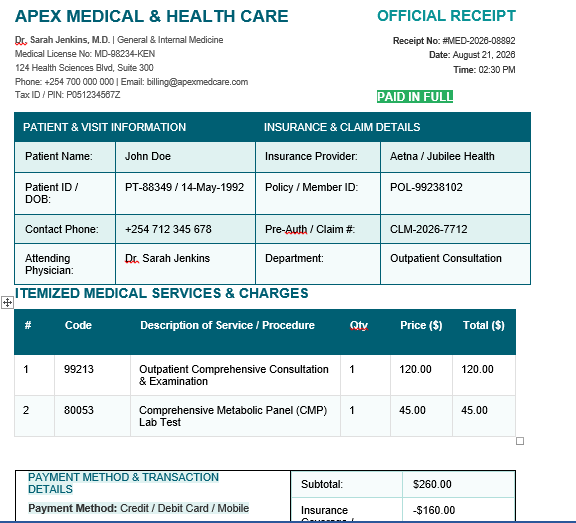
Get a pre-formatted, organized doctor’s office receipt ready for immediate customization. You can edit this directly in your browser or download it in Microsoft Word (.docx) format.
Related: Medical Receipt Generator
What is Included in the Template?
This medical receipt features a clean teal design and includes essential billing fields required for clinical records:
- Clinic & Practitioner Header: Space for clinic name, attending physician credentials, medical license number, contact info, and tax PIN.
- Patient & Insurance Metadata: Designated fields for patient ID, date of birth, insurance provider, policy number, and claim pre-authorization codes.
- Itemized Billing Table: Structured columns for CPT/ICD procedure codes, detailed service descriptions, unit costs, and item totals.
- Payment & Co-Pay Breakdown: Clear calculations for subtotal, insurance adjustments, patient co-pay, total amount paid, and balance remaining.
- Payment Status Indicator: Highlighted “PAID IN FULL” badge alongside transaction reference numbers and payment methods.
- Follow-up & Authorization: Section for follow-up appointment notes, patient portal instructions, and an authorized signature/stamp line.
Frequently Asked Questions
Is this template customizable for my medical practice?
Yes. You can update the clinic logo, contact information, service rates, and color scheme directly in Google Docs or Microsoft Word.
Does this receipt support insurance reimbursement claims?
Yes. It includes standard CPT/ICD billing codes, claim reference numbers, and itemized fee breakdowns required by insurance providers.
Can I export the completed receipt as a PDF?
Yes. Once you finish editing in Google Docs or Word, select File > Download > PDF Document (.pdf) to generate a print-ready file for your patient.