
Below thermal receipt generator creates a narrow, POS-style receipt you can download as a PDF or print in seconds. Add your items, tax and payment details, choose 57 mm or 80 mm paper, and the tool builds the receipt for you.
This free generator runs in your browser. There is no account, no watermark and nothing to install.
Business
Receipt details
Items
What is a Thermal Receipt Generator?
A thermal receipt generator converts basic sales information into the narrow, monospaced layout optimized for heat-sensitive paper printers. Unlike invoice software that outputs full A4 or Letter pages, this tool produces receipts that match the exact width, margins, and structure used by cafés, retail shops, and mobile vendors.
Why The 52 mm Format Matters
Most desktop thermal printers use 80mm rolls, but portable printers and compact retail systems default to 52mm or 58mm paper. Formatting a standard document for these devices causes misaligned text, wasted paper, and frequent print jams. This generator solves that by:
- Matching standard thermal paper widths exactly
- Using monospaced, print-ready fonts for crisp alignment
- Keeping margins tight to conserve thermal roll length
- Rendering a realistic layout so you know exactly how the printed receipt will look
How to Make a Thermal Receipt in 5 Steps
- Choose the paper width and currency. Pick 57 mm or 80 mm to match your printer roll, then select the currency.
- Enter your business details. Add the business name, address and phone number.
- Set the receipt number and date. Leave both on Automatic, or switch to Manual to match your own numbering or a past sale.
- Add items, tax and discount. Type each item’s name, quantity and price. Then enter the tax rate and any discount percentage.
- Download or print. Click Download Receipt (PDF) above the preview, or use Print for a paper copy.
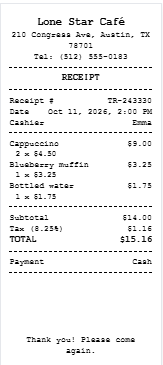
What a Thermal Receipt Should Include
A thermal receipt is short, so every line must earn its place. These are the fields customers and accountants expect.
| Section | What to show |
|---|---|
| Header | Business name, address and phone |
| Receipt details | Receipt number, date and time, cashier |
| Items | Name, quantity, unit price and line total |
| Totals | Subtotal, discount, tax rate and amount, final total |
| Payment | Payment method, amount tendered and change |
| Footer | Thank-you message, return policy or website |
How to Print a Thermal Receipt From Your Browser
Most printing problems come from the print dialog, not the receipt. Work through these settings in order.
- Click Print under the preview and choose your thermal printer from the list.
- Set the paper size to your roll width, 57 mm or 80 mm, or a custom size of that width.
- Set margins to None or minimal.
- Turn off Headers and footers. This removes the page title and web address that otherwise print at the top and bottom.
- Keep the scale at 100%.
No thermal printer? Download the PDF and print it on a regular sheet, then trim it. You can also send the PDF by email or message.
FAQs
What is a thermal receipt generator?
It is an online tool that formats your sale details as a narrow, POS-style receipt. You enter items, tax and payment, and it calculates the totals and produces a printable or downloadable receipt.
Is this thermal receipt generator free?
Yes. It is free, needs no account, and the PDF has no watermark.
Which paper widths does it support?
57 mm and 80 mm. Use 57 mm for portable printers and 80 mm for countertop POS printers.
Can I download the receipt as a PDF?
Yes. Click Download Receipt (PDF) above the preview. The page is cut to the receipt’s length, not a full A4 sheet.
Do I need a thermal printer to use it?
No. You can download the PDF and print it on a regular printer, then trim it, or send it digitally.
Which currencies and taxes are supported?
There are 11 currencies, including US dollars, British pounds, euros and Canadian dollars. Enter the tax rate as a percentage and the receipt shows the tax amount on its own line.
Can I add a discount or show change?
Yes. Add a percentage discount, and enter the amount tendered to print the change due.
Why does my printed receipt show a web address at the top?
Your browser’s headers and footers are switched on. Turn them off in the print dialog and set margins to none.
Do thermal receipts fade?
Yes. The heat-sensitive coating reacts to heat, light and friction, so save a PDF copy for your records.
Does the tool store my data?
The receipt is built in your browser, and the tool does not send your entries to a server. Download your PDF before closing the page, because nothing is saved for later.
Conclusion
Skip expensive POS subscriptions and manual carbon receipt pads. This free thermal receipt generator delivers precise 52mm formatting, multi-currency support, and instant PDF export directly in your browser. Whether you run a food truck, manage a retail counter, or need quick proof of payment for clients, the tool gives you professional results in seconds. Generate, print, and get back to business.