
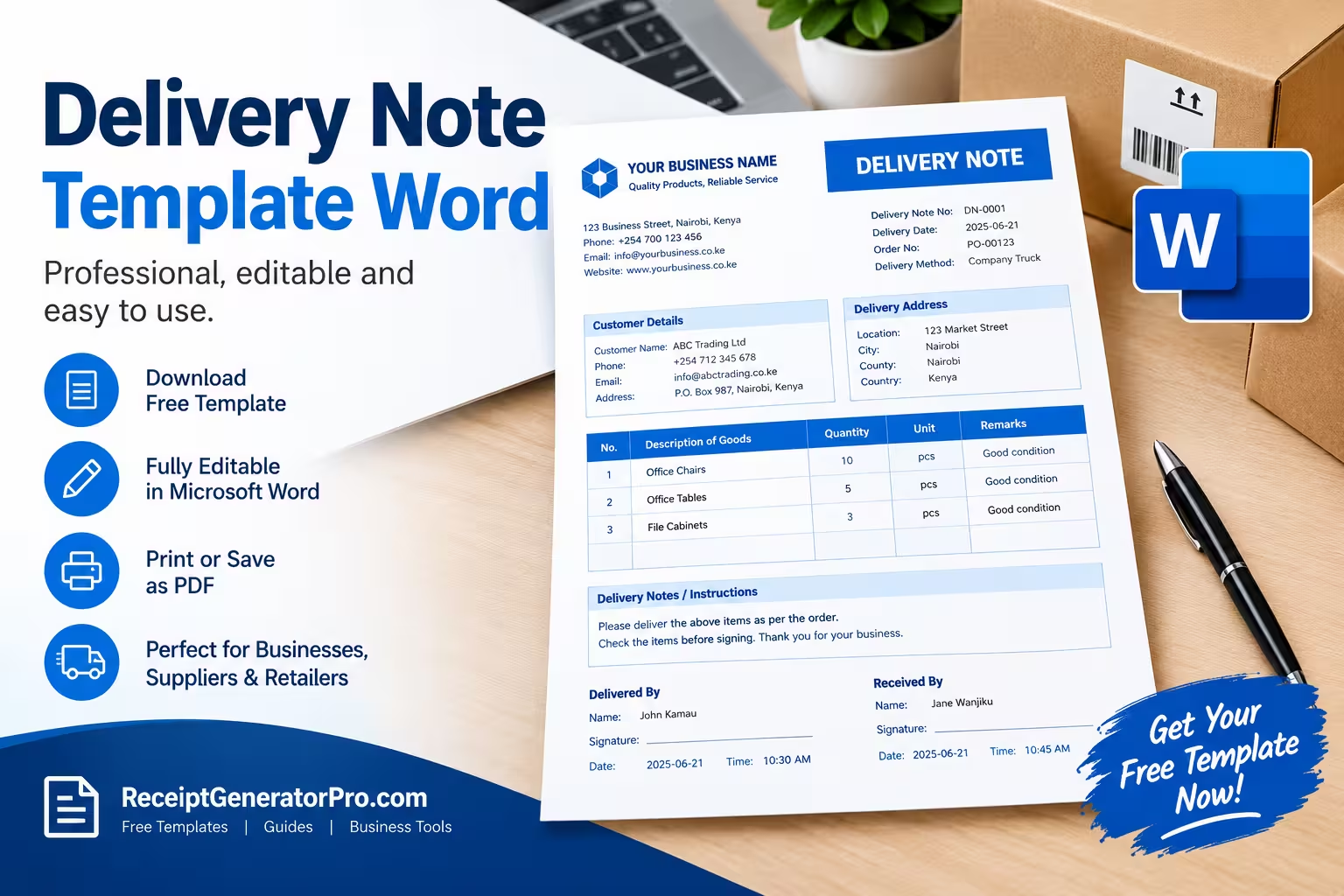
Looking for a delivery note template in Word DOCX that you can easily edit and print? We have created a professional, editable delivery note template in Microsoft Word that you can download and customize for your business.
Our free delivery note template Word document is suitable for businesses, suppliers, retailers, wholesalers, contractors, and other professionals who deliver products or goods to customers.
Download Free Delivery Note Template
The template is designed for businesses and professionals providing product delivery and other delivery-related services. You can open it in Microsoft Word, replace the blank fields with your own information, and print or save it as a digital document.
You can add your business name, customer details, delivery information, products delivered, quantities, order numbers, special instructions, and signatures.
The template is intentionally simple so that you can adapt it to different types of deliveries without having to create a delivery note from scratch.
What is a Delivery Note Template?
A delivery note is a document that accompanies goods when they are delivered to a customer. It provides information about what has been delivered and helps the recipient check the shipment against the order.
A delivery note commonly includes the delivery date, description of goods, quantities, customer information, and other delivery details. HM Revenue & Customs explains that delivery notes normally describe the nature and quantities of goods delivered and include the delivery date. A customer’s signature can also provide evidence of delivery and the delivery date.
A delivery note is different from an invoice. A delivery note primarily documents the delivery, while an invoice is used to request payment for goods or services.
For businesses that use invoices, the delivery note can also be kept with the relevant invoice and other transaction records. HMRC identifies delivery notes among the business records that may be useful for accounting and record-keeping purposes.
Create Professional Receipts and Invoices Online
If you need more than a delivery note, Receipt Generator Pro also provides tools and templates for creating business documents.
You can use our free invoice generator to create professional invoices for customers and keep your billing process organized.
A delivery note and invoice can work together. The delivery note confirms what was delivered, while the invoice provides the financial details of the transaction.
How to Use the Delivery Note Template
Using this delivery note template in Word is straightforward.
1. Download the Word template
Download the .DOCX file and open it with Microsoft Word or another compatible word-processing program.
2. Add your business information
Enter your business name, address, phone number, email address, and website if applicable.
Adding your business information makes the delivery document easier for customers to identify and keeps your records organized.
3. Add delivery details
Enter the delivery note number, delivery date, customer order or purchase order number, and delivery method.
Using a unique delivery note number can make it easier to find a particular delivery later.
4. Enter customer information
Add the customer’s name, company, phone number, email address, and delivery address.
Make sure the delivery address is accurate, especially when the customer has multiple branches or delivery locations.
5. List the items delivered
Use the item table to enter each product or item included in the delivery.
The template includes fields for the item number, product description, quantity, unit, and remarks. This allows the customer to compare the delivery with their order.
6. Add delivery notes
Use the notes section to record special instructions, delivery conditions, damaged items, missing items, or other relevant information.
This section can be particularly useful when there are exceptions or issues that need to be documented at the time of delivery.
7. Get the delivery acknowledged
The template includes spaces for the person delivering the goods and the person receiving them.
The recipient can enter their name, signature, date, and time. A signed delivery note can provide useful evidence that the goods were received.
What Is Included in the Delivery Note Template?
Our editable delivery note template includes the main information businesses commonly need when documenting deliveries.
It includes:
- Business or supplier information
- Delivery note number
- Delivery date
- Customer or recipient information
- Delivery address
- Order or purchase order number
- Delivery method or driver information
- Product or item description
- Quantity
- Unit
- Remarks
- Delivery instructions
- Condition of goods or exceptions
- Name and signature of the person delivering
- Name and signature of the person receiving
- Delivery date and time
The format can also be modified in Microsoft Word if your business needs additional fields.
Should a Delivery Note Include Prices?
A delivery note does not necessarily need to include prices.
Its primary purpose is to document the goods being delivered and allow the recipient to check the delivery. HMRC’s accounting guidance notes that a delivery note may not show the price and can later be attached to the corresponding invoice.
If you want to show prices, you can add columns for unit price and total price. However, many businesses keep pricing information on the invoice while using the delivery note primarily for delivery and quantity verification.
Why Use a Word Delivery Note Template?
Using an editable Word template saves time compared with creating a new delivery document every time you make a delivery.
You can customize the document with your business branding, save a master copy, and create a new delivery note whenever you need one.
Word is also useful because the document can be edited on most computers and can easily be printed or saved as a PDF for digital record-keeping.
A standardized delivery note can also help your business maintain consistent delivery records.
Frequently Asked Questions
What is a delivery note used for?
A delivery note is used to document goods delivered to a customer. It helps the recipient check the items and quantities received and can provide evidence that a delivery took place.
Is a delivery note the same as an invoice?
No. A delivery note documents the delivery of goods, while an invoice requests payment and provides financial details about the transaction.
Can I edit this delivery note template in Word?
Yes. The template is provided as an editable Microsoft Word .DOCX document. You can change the business information, customer details, item fields, and other sections to suit your needs.
Should a delivery note have a delivery note number?
Using a unique delivery note number is recommended because it makes individual deliveries easier to identify, reference, and organize in your records.
Can I use a delivery note for services?
A delivery note is primarily associated with the delivery of goods. For services, a service completion form, work order, service report, or similar document may be more appropriate depending on the nature of the work.
Final Thoughts
A professional delivery note makes it easier to document what was delivered, when it was delivered, and who received it. It can also help businesses maintain organized transaction records and support the process of checking deliveries against customer orders.
Our free delivery note template Word DOCX gives you a simple starting point that you can customize for your business. Download it, add your business and customer information, list the items delivered, and obtain a recipient acknowledgment when appropriate.
For businesses that also need billing documents, you can use the Receipt Generator Pro invoice generator alongside your delivery notes to manage your invoicing process.