
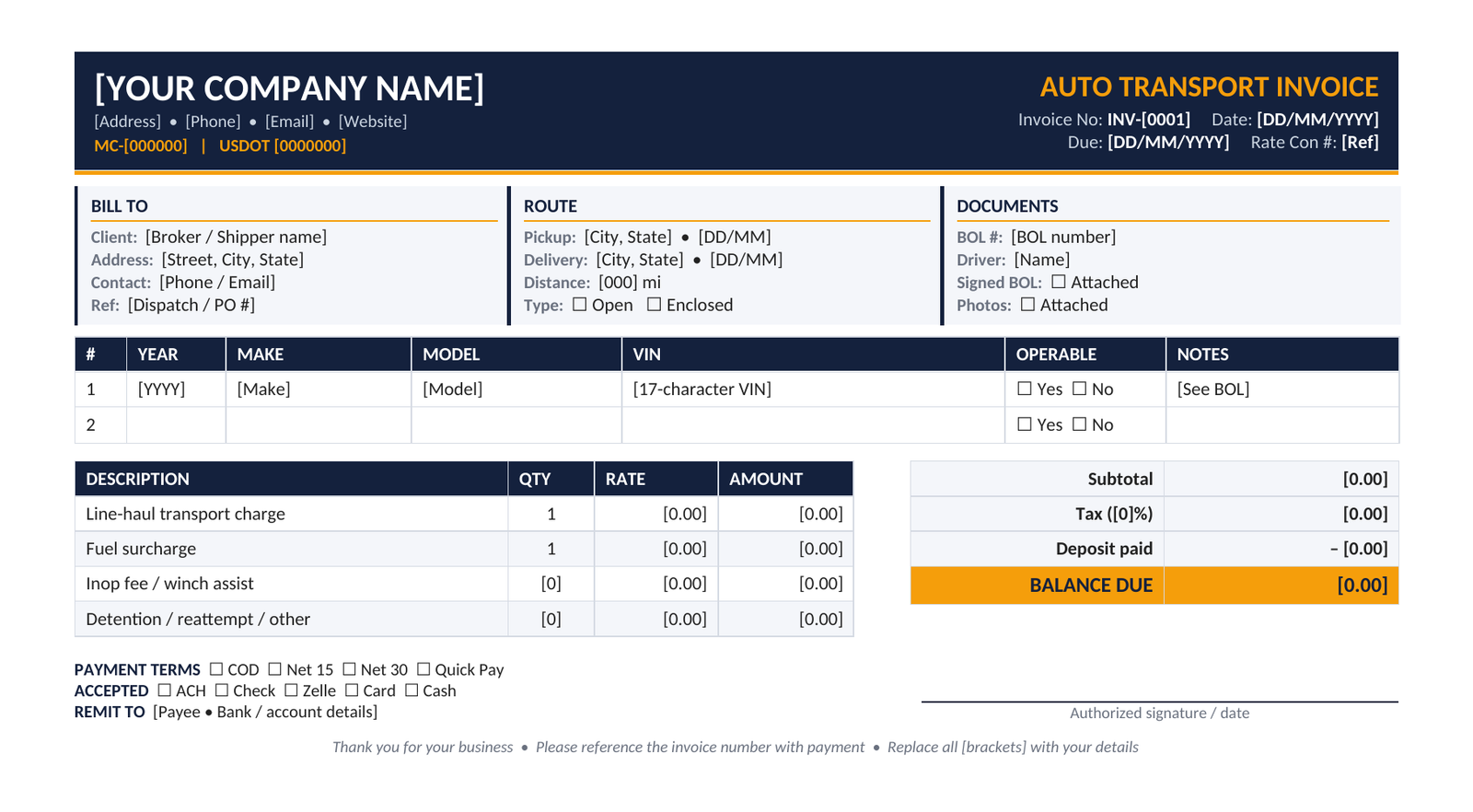
Download a free, editable auto transport invoice template in Word. Includes MC/DOT fields, VIN table, fuel surcharge, inop fees, deposit credit, and a filled-in example.
If you haul cars, you only get paid once your invoice is clean, complete and matches what the customer agreed to. This guide gives you a free auto transport invoice template in Word (.docx) you can edit in minutes. It also shows what to include, how to bill tricky situations, and which mistakes delay payment.
Download the Free Auto Transport Invoice Template
Open it in Microsoft Word, Google Docs or LibreOffice. You can edit every field, so replace each [bracketed placeholder], delete unused rows, and save a master copy. The template includes:
- Carrier block with MC and USDOT numbers
- Bill-to block for brokers or shippers
- Pickup and delivery details and open/enclosed transport type
- Vehicle table with year, make, model, VIN, operable status and condition notes
- Itemized charges: line-haul, fuel surcharge, inop fee, winch assist, enclosed upcharge, detention, reattempt, and a custom row
- Subtotal, taxes, deposit credit and total balance due
- Payment terms, accepted methods, BOL and photo attachment checklist, and a signature line
Prefer to generate invoices online instead of editing a document? Try this transport receipt generator to create a transport receipt in seconds.
What is an Auto Transport Invoice?
An auto transport invoice (also called a car hauler invoice or vehicle shipping invoice) is the payment request a carrier sends to a broker, dealer or customer after delivering a vehicle. It records what was moved, where, and what is owed. It differs from a generic freight invoice because it is tied to specific vehicles (VINs), condition documentation, and vehicle-specific add-ons like inop fees.
Invoice vs. bill of lading: the bill of lading (BOL) records the vehicle’s condition and the handoff at pickup and delivery. The invoice asks for payment and should reference the BOL number.
Related: Transport Receipt Generator
What to Include on an Auto Transport Invoice
1. Carrier details
- Legal company name, address, phone, email
- MC number and USDOT number. Brokers’ accounts-payable teams often hold invoices that lack them.
2. Customer details
- Broker or shipper name, address, contact, and their order or dispatch reference
3. Invoice basics
- Unique, sequential invoice number
- Invoice date and due date
4. Vehicle and route details
- Year, make, model and VIN for every vehicle
- Pickup and delivery addresses, and pickup and delivery dates
- Open or enclosed transport
- Whether the vehicle was operable, plus the BOL number
5. Itemized charges
Never bundle everything into one line. Show each charge separately:
- Line-haul (flat per vehicle or per-mile)
- Fuel surcharge
- Accessorials: inoperable fee, winching, enclosed upcharge, detention, reattempt or redelivery, storage
6. Totals and credits
- Subtotal, taxes (if applicable), any deposit paid, and the balance due
7. Payment terms and proof
- Terms (COD, quick pay, net 15 or 30), accepted payment methods, remit-to details
- Reference to the signed BOL, delivery photos and rate confirmation
Filled-In Example Invoice
| Description | Qty | Rate | Amount |
|---|---|---|---|
| Line-haul, Dallas, TX → Denver, CO (open) | 1 | $880.00 | $880.00 |
| Fuel surcharge | 1 | $40.00 | $40.00 |
| Inoperable vehicle fee | 1 | $75.00 | $75.00 |
| Subtotal | $995.00 | ||
| Less: broker deposit (paid) | – $150.00 | ||
| Balance due on delivery | $845.00 |
Sample figures for illustration only. Use the rates agreed in your rate confirmation.
Showing the deposit as a credit, and only the remaining balance as due, avoids confusion at delivery.
How to Bill Common Auto Transport Scenarios
- Broker deposit plus COD balance. List the full price, show the deposit as a credit, and show the remaining balance. Label broker fees and carrier line-haul separately so it is clear what the carrier is owed.
- Inoperable vehicle. Add a separate “Inop fee” line and note the vehicle’s condition on the invoice and BOL.
- Enclosed transport. Show it as a line-haul line or as an upcharge, whichever matches your rate confirmation.
- Reattempt, detention or storage. Add the line with quantity (hours, days, attempts) and rate. Get accessorials approved before you invoice them.
- Multiple vehicles on one load. Use one row per vehicle in the vehicle table, then one charge line per vehicle or a clearly labeled total.
FAQs
What should be on an auto transport invoice?
Carrier and customer details, MC/DOT numbers, invoice number and dates, vehicle year/make/model/VIN, pickup and delivery locations, itemized charges, payment terms and a BOL reference.
Can I edit this template in Word and Google Docs?
Yes. The .docx opens in Word, Google Docs and LibreOffice, and all fields are editable.
How do I invoice a deposit and a COD balance?
Show the total, list the deposit as a credit, and display only the remaining balance as due.
Do I need a separate invoice for each vehicle?
Not always. One invoice can cover several vehicles if each is listed with its VIN and charges.
What’s the difference between an invoice and a receipt?
An invoice requests payment. A receipt confirms it was received. You can create receipts with a transport receipt generator.
Is a bill of lading the same as an invoice?
No. The BOL documents vehicle condition and custody transfer. The invoice requests payment and references the BOL.
Final Thoughts
A good invoice is itemized, matches your rate confirmation, and arrives with proof of delivery attached. Download the template above, personalize it once, and send an invoice for every load on the day you deliver.