Every sale needs proof. Whether you run a home bakery, a cleaning service, a freelance studio or a weekend market stall, a clear receipt protects you and your customer. It confirms what was paid, when, and for what, and it gives you a clean paper trail when tax season arrives.
The good news: you don’t need expensive software or a pre-printed book from an office store. We’ve created a free, fully editable receipt book in Microsoft Word that you can customize with your business name and print today.
What’s Inside The Free Receipt Book
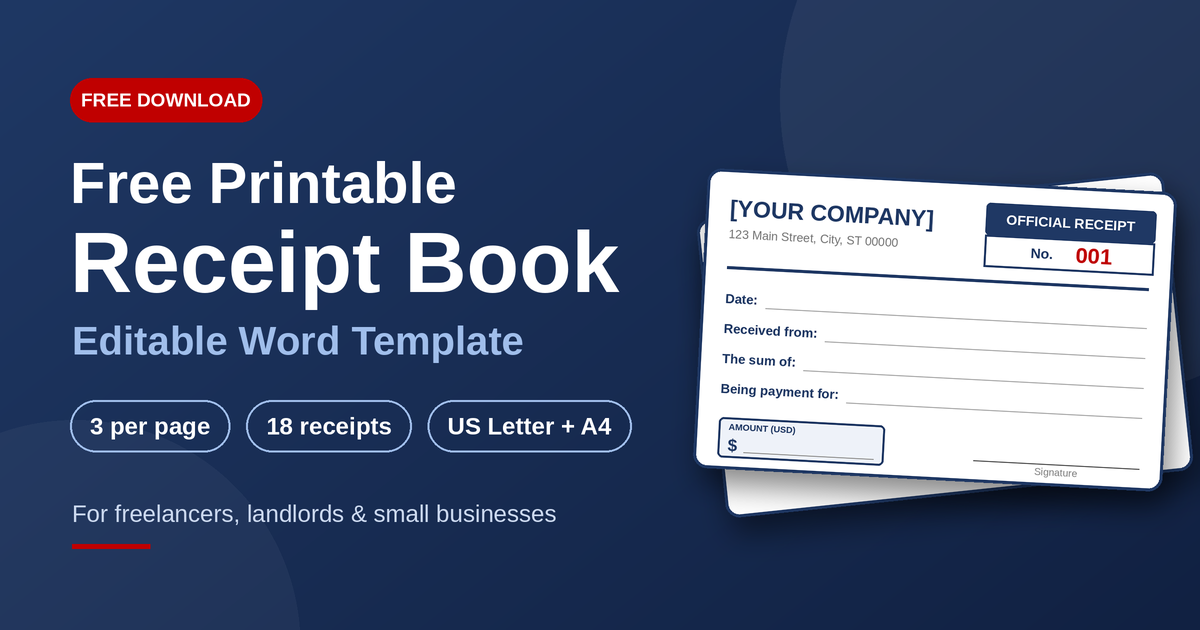
- Three receipts per page, so you get more out of every sheet.
- 6 pages, 18 pre-numbered receipts (001 to 018), ready to cut and use.
- Cut lines between receipts for clean, quick trimming.
- A clean navy-and-red design that prints well in color or black and white.
- Fully editable text, so you can change the company name, tagline, address, phone number and email in minutes.
- US-friendly details, including dollar amounts, check and Zelle/Venmo options, and a US address format.
Prefer A4 paper? We include an A4 version too, so international customers or print shops can use the same design.
How to Use Your Receipt Book (Step by Step)
- Download the file using the button above and open it in Microsoft Word, or any editor that opens .docx files.
- Replace the placeholders. Click on the bracketed text at the top of the first receipt and type in your business name, tagline, address, phone and email.
- Copy your details to the other receipts. Select the first receipt, copy it, and paste it over the rest. You can also use Find & Replace (Ctrl+H) to change the text everywhere at once.
- Print on Letter paper. Use the “Actual size” option rather than “Fit to page” so the layout stays accurate.
- Cut along the dotted lines, then staple, bind or clip the sheets into a book.
- Fill in each receipt by hand at the time of payment, and give the customer the original.
Tips to Get the Most From Your Receipt Book
- Use a duplicate copy. Print the sheets twice, or place carbon paper between them, so you always keep a record of what you gave the customer.
- Never skip numbers. If you make a mistake, mark the receipt “VOID” instead of throwing it away.
- Record the invoice number. Linking receipts to invoices keeps your books tidy.
- Store a digital copy. Snap a quick photo or scan of each receipt in case the paper gets lost.
- Add your logo. Insert it in the header for a more polished, branded look.
- Keep receipts organized. A simple folder or envelope by month makes tax time much less stressful.
Who Is This Receipt Book For?
This template works well for:
- Freelancers and consultants
- Landlords and property managers
- Home-based and craft businesses
- Tutors, coaches and trainers
- Repair, cleaning and handyman services
- Nonprofits, clubs and churches collecting dues or donations
- Market vendors and pop-up sellers
If you take payments and want a simple, professional record, this book will fit.
Frequently Asked Questions
Is the receipt book really free?
Yes. You can download, edit and print it at no cost for your own business use.
Do I need Microsoft Word?
Word gives the best results, but the file also opens in Google Docs, LibreOffice and Apple Pages. Check the layout after opening, as small differences can occur.
Can I add my logo and change the colors?
Absolutely. Everything is editable, including fonts, colors and layout.
Is a handwritten receipt valid?
A handwritten receipt that clearly shows the date, amount, payer, purpose and your details is widely used as a record of payment. Requirements can vary by state and by situation, so check with a tax professional if you’re unsure. This template is not legal or tax advice.
Does it calculate sales tax?
No. It’s designed for simple manual receipts. If you collect sales tax, write the tax amount in the description line or add a tax line of your own, following your state’s rules.
Download Your Free Receipt Book Today
Good record-keeping doesn’t have to be complicated. With a clean, numbered receipt book, you’ll look more professional, stay organized and protect yourself if a payment question ever comes up.
Have a suggestion or want another free template, such as an invoice, quotation or delivery note? Leave a comment or contact us and we’ll consider it for our next release.