
Create professional supermarket receipts online. Add store details, items, quantities, prices and tax. Calculate totals automatically, then print or save your receipt as PDF.
| Item Description | Qty | Incl. Price |
|---|
Creating a professional supermarket receipt does not have to be complicated. Our Supermarket Receipt Generator allows you to create a detailed and professional-looking receipt online in just a few steps.
This tool is useful for supermarkets, grocery shops, mini-markets, wholesalers, retail stores and anyone who needs a clean supermarket-style receipt.
How to Use the Supermarket Receipt Generator
Follow these simple steps to create your receipt.
Step 1: Enter Your Supermarket Name
Start by entering the name of your supermarket, grocery store or retail business.
Step 2: Add Your Store Address
Enter the physical address or location of your supermarket.
You can include details such as:
- Town or city
- Building name
- Street
- Branch location
- Postal address
A clear address helps customers identify where the transaction took place.
Step 3: Enter Your Telephone Number
Add the supermarket’s customer service or contact phone number.
Customers can use this information when they need to contact the business regarding a purchase or receipt.
Step 4: Add Your PIN Number
If your receipt requires a business PIN number, enter it in the PIN field.
This helps make the receipt more complete and suitable for businesses that include tax or registration information on their sales receipts.
Step 5: Enter the Transaction Date and Time
Select or enter the date and time when the transaction occurred.
The receipt generator displays the transaction date and time clearly on the receipt.
Step 6: Add the Purchased Goods
Now add the items purchased by the customer.
For each product, enter the:
- Item description
- Quantity
- Unit price
- Amount
Step 7: Check the Automatic Calculations
One of the biggest benefits of using the supermarket receipt generator is automatic calculation.
The tool calculates important receipt totals, including:
- Subtotal
- VAT or tax at 16%
- Total amount due
This reduces manual calculation errors and saves time.
You do not have to calculate every total manually. Simply enter the goods, quantities and prices, and the receipt generator handles the calculations.
Step 8: Select the Payment Method
Enter or select the customer’s payment method.
Examples may include:
- Cash
- Mobile
- Card
- Bank
- Other payment methods
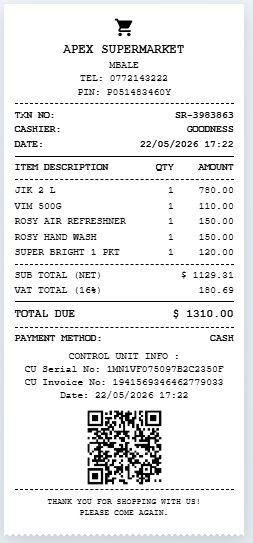
Create professional receipts in seconds with Receipt Generator Pro.
Frequently Asked Questions
Is the supermarket receipt generator free to use?
The availability of free features depends on the access options provided on the receipt generator page. You can open the tool and create your supermarket receipt online.
Can I add my supermarket name?
Yes. You can enter your supermarket or store name, and it will appear on the receipt.
Can I add multiple items?
Yes. You can add goods with their descriptions, quantities and prices to create a detailed supermarket receipt.
Does the tool calculate totals automatically?
Yes. The generator automatically calculates receipt totals based on the items, quantities and prices entered