
Looking for a dentist receipt template in Word DOCX?
We have created a professional, editable dentist receipt template in Microsoft Word (.DOCX) that you can download and customize for your needs.
Download our dentist receipt template
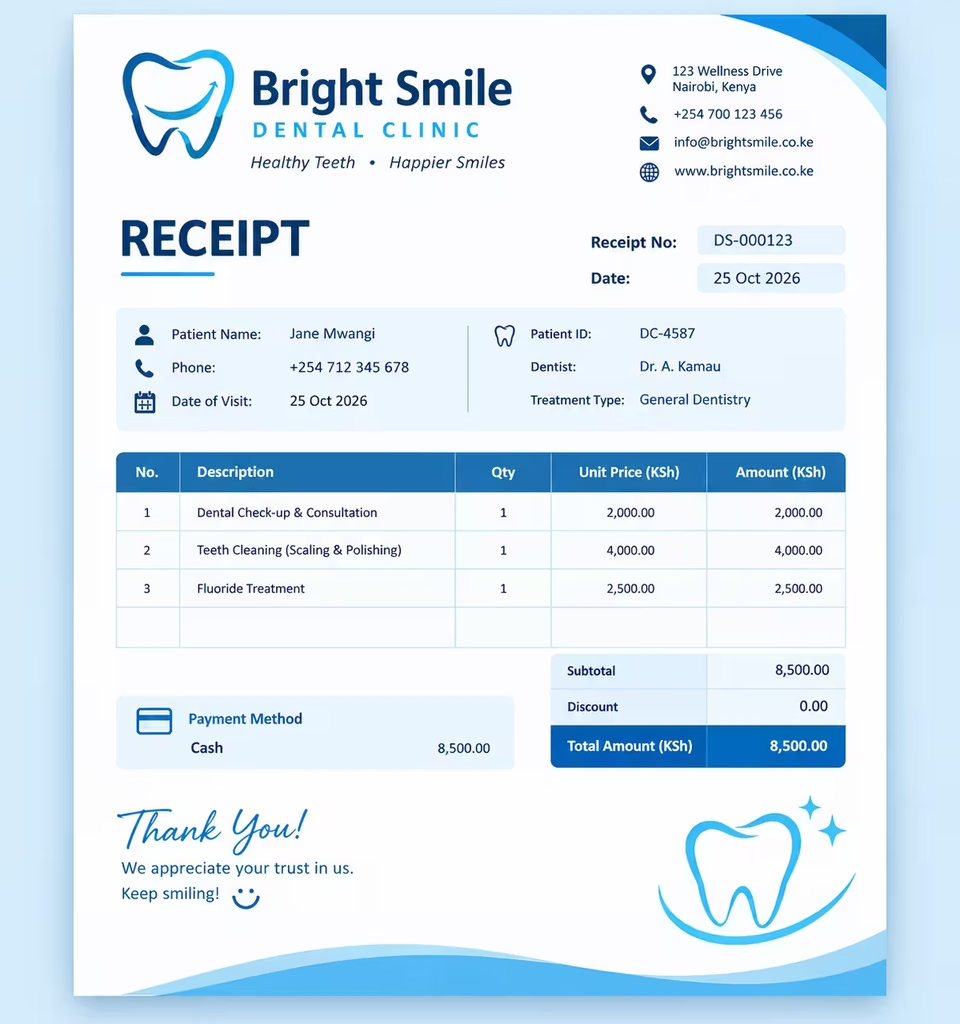
The template is designed for dentists, dental clinics, orthodontists, oral surgeons, hygienists, and other professionals providing dental services.
You can replace the blank fields with your own practice information, patient details, treatment and procedure details, prices, and payment terms. It fits on one US Letter page, so it prints cleanly and also works as a PDF.
Disclaimer: This template is for general use and is not legal, tax, or medical billing advice. Check requirements with your accountant or billing specialist.
What is a dentist receipt?
A dentist receipt is a written record confirming that a patient has paid for dental care. It shows who provided the treatment, who received it, what was done, what it cost, and how the patient paid. Think of it as proof of payment that both sides can rely on later.
A receipt is not the same as an invoice. An invoice asks for payment and lists what is owed. A receipt confirms that payment has already been made, whether in full or in part. Many practices issue an invoice or treatment estimate first, then a receipt once the patient settles up.
Patients need this document for several reasons:
- Insurance claims. Reimbursement requests usually require itemized proof of payment.
- Tax purposes. In the United States, unreimbursed dental expenses may count toward medical expense deductions. Always confirm eligibility with a tax professional.
- HSA and FSA reimbursement. Plan administrators typically ask for receipts showing the date, provider, service, and amount.
- Personal records. Keeping receipts helps patients track long treatment plans such as braces, implants, or crowns.
For the practice, issuing clear receipts reduces billing disputes, supports bookkeeping, and gives your front desk a consistent, professional process.
How to use the dentist receipt template
You do not need design skills or special software. Follow these steps:
- Download the file. Click the download button and save the DOCX to your computer or cloud drive.
- Open it in Microsoft Word. The template also works in Google Docs, LibreOffice, and Word for the web.
- Add your practice details. Replace the bracketed placeholders with your practice name, dentist name and credentials, address, phone number, email, and NPI or tax ID.
- Fill in the patient information. Enter the patient’s name, ID number, and contact details. Add insurance details if a third party paid part of the bill.
- List the services. Type each procedure, its CDT code, the tooth number if relevant, quantity, and price. Add or delete rows as needed.
- Check the totals. Enter the subtotal, any discount, insurance payment, and tax. Then confirm the total paid and any remaining balance.
- Mark the payment method and status. Tick cash, card, check, HSA/FSA, or transfer, and note whether the balance is paid in full.
- Save and share. Save one copy for your records, then print it or export it as a PDF to email to the patient.
Tip: Save a clean copy of the blank template once your practice details are filled in. After that, each new receipt only needs patient and service information.
What is included in the dentist receipt template
The template covers everything a patient or insurer would expect to see:
- Practice header. Space for your practice name, dentist name, address, contact details, and NPI or tax ID.
- Receipt details. A receipt number, date of service, and date paid, so every record is easy to trace.
- Patient information. Name, patient ID, address, and contact details.
- Insurance section. Provider, policy or member ID, claim number, and the amount insurance paid. Skip it for self-pay patients.
- Itemized services table. Columns for procedure, CDT code, tooth number, quantity, unit price, and amount. It is pre-filled with common examples such as an oral exam, cleaning, bitewing X-rays, and a composite filling, which you can overwrite.
- Totals block. Subtotal, discount, insurance payment, tax, total paid by the patient, and remaining balance.
- Payment method and status. Checkboxes for how the patient paid and whether the account is settled, plus a transaction or check number and the next appointment date.
- Notes area. Room for aftercare instructions, treatment notes, or payment terms.
- Signature line and thank-you message. A finishing touch that adds authenticity and reinforces patient trust.
Everything is fully editable, so you can change fonts, colors, and wording, or add your logo at the top.
FAQs
Is the dentist receipt template really free?
Yes. You can download, edit, and use the template at no cost for your practice.
Can I edit the template in Microsoft Word?
Yes. It is a standard .DOCX file, so every field, table, and line of text can be edited in Word, Google Docs, or LibreOffice.
Can patients use a dentist receipt for insurance claims?
Usually, yes. Insurers often accept an itemized receipt showing the provider, date, procedures, and amount paid. Requirements vary by insurer, so patients should check their plan.
Is a dentist receipt different from a dental invoice?
Yes. An invoice requests payment, while a receipt confirms payment was received.
Create professional receipts in seconds with Receipt Generator Pro.