
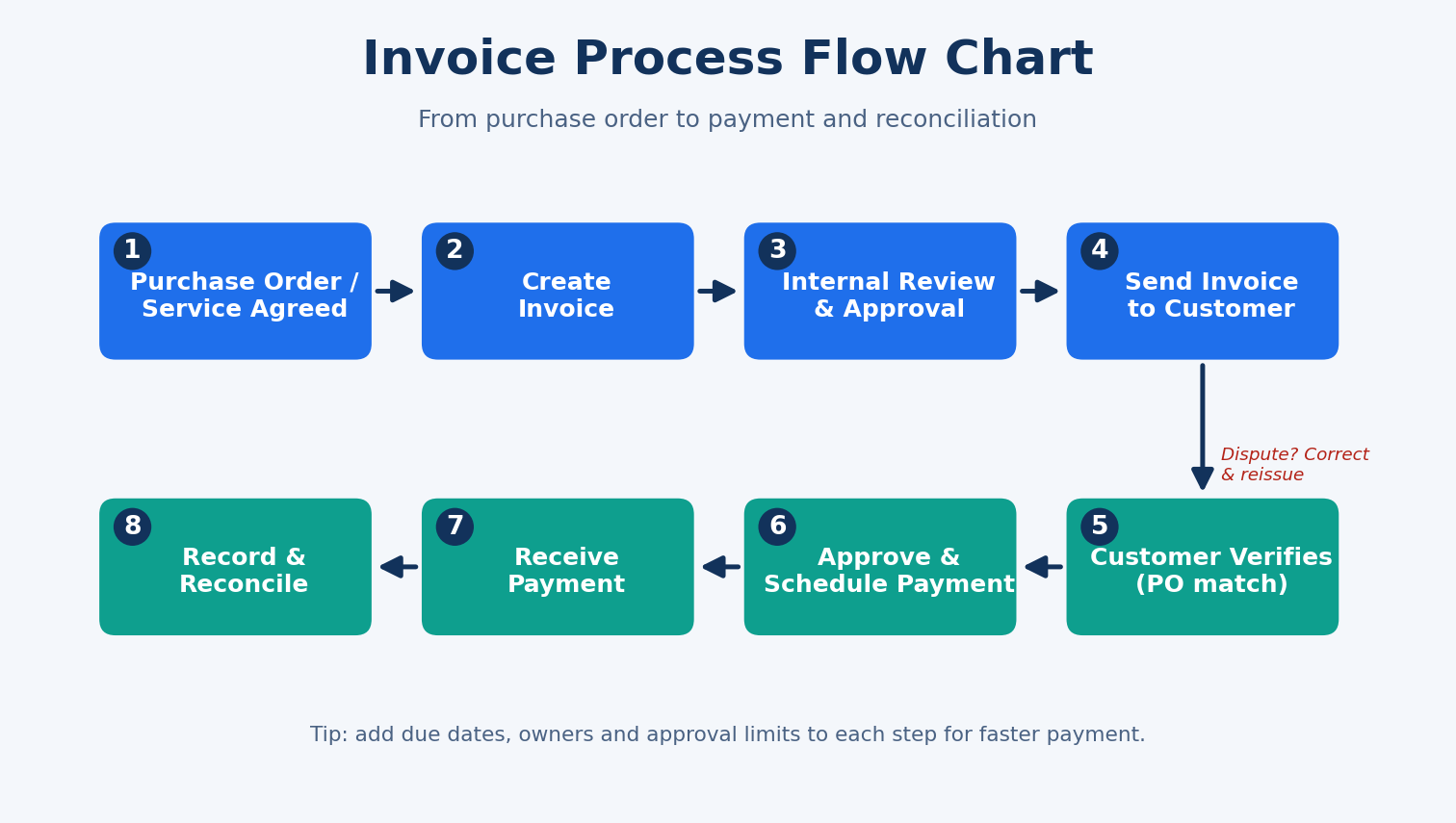
An invoice process flow chart template is a visual diagram that maps every step of billing, from the purchase order to creating, approving, sending, paying and reconciling an invoice. You can use our free docx invoice process flow chart template to document and standardize your workflow in minutes.
If invoices in your business are sent late, paid late or get lost in email threads, you probably don’t have a process problem. You have a visibility problem. A flow chart fixes that by showing everyone who does what, in what order, and where an invoice can get stuck.
This guide walks through the standard invoice process, explains what to include in your template, and shows you how to customize it for your team.
Table of Contents
What Is an Invoice Process Flow Chart?
An invoice process flow chart is a diagram that uses simple shapes and arrows to show how an invoice moves through your organization. Each box is a task, each arrow is a handoff, and each diamond is a decision, such as “Is the invoice approved?”
It’s useful for both sides of the transaction:
- Accounts receivable (AR): the steps for billing customers and collecting payment.
- Accounts payable (AP): the steps for receiving, checking and paying supplier invoices.
Download Invoice Process Flow Chart Template
To get the most from the template, use it like this:
- Download the free docx invoice process flow chart template.
- Replace the sample steps with your actual workflow.
- Assign an owner and a deadline to each step.
- Add decision paths for disputes and late payments.
- Share it with your team and review it every quarter.
How to Customize the Template
Freelancers and small businesses can keep it lean: create, send, follow up, get paid. Three or four boxes may be enough.
Growing teams should add an internal approval step, an invoice numbering rule and a reminder schedule, for example a nudge at 3 days before the due date and again at 7 days after.
Accounts payable teams should reverse the view: receive the supplier invoice, match it to the PO and goods receipt (the “three-way match”), route it for approval and then pay.
Finance managers can add approval limits, such as “Invoices above a set amount need a second approver.”
Why Your Business Needs an Invoice Process Flow Chart
A documented process pays for itself quickly. Here’s what you get:
- Faster payments. Clear steps and owners reduce delays between work done and cash received.
- Fewer errors. A built-in review step catches wrong amounts, missing PO numbers and duplicate invoices.
- Easier onboarding. New team members learn the process by looking at one page.
- Better accountability. Every step has an owner, so nothing falls through the cracks.
- Audit readiness. Approvers, dates and records are easy to trace.
The 8 Steps of the Invoice Process
Our template follows the eight-step workflow in the featured image above.
1. Purchase order or service agreement. The process starts when a customer places an order or agrees to a scope of work. Capture the PO number, pricing and payment terms here, because they drive everything that follows.
2. Create the invoice. Prepare the invoice with your business details, a unique invoice number, the customer’s details, itemized goods or services, taxes, the total due, the due date and payment instructions.
3. Internal review and approval. Before it goes out, someone checks the figures against the order or contract. This one step prevents most disputes and credit notes.
4. Send the invoice to the customer. Send it by email, portal or e-invoicing system. Record the date sent so you can track follow-ups accurately.
5. Customer verification. The customer matches your invoice to their PO and delivery or service records. If something is wrong, they raise a dispute, and you correct and reissue the invoice.
6. Approve and schedule payment. Once verified, the invoice is approved and scheduled according to the agreed terms, such as Net 15, Net 30 or Net 60.
7. Receive payment. The customer pays by bank transfer, mobile money, card or another agreed method. Send a payment confirmation or receipt.
8. Record and reconcile. Match the payment to the invoice in your accounting records, close it out and file the documents. Any short payments or overpayments get resolved here.
What to Include in Your Invoice Process Flow Chart Template
A good template is simple enough to read at a glance. Make sure yours includes:
- Start and end points, usually shown as rounded shapes
- Process steps, shown as rectangles
- Decision points, shown as diamonds, such as “Invoice correct? Yes/No”
- Role labels, such as sales, finance manager, customer
- Timeframes, such as “approve within 2 business days”
- Document references, such as PO, delivery note, credit note
- Exception paths for disputes, late payments and rejected invoices
Frequently Asked Questions
What is the invoice process flow?
It’s the sequence of steps from agreeing on an order to creating, approving, sending, paying and recording an invoice.
How many steps are in an invoice process?
Most businesses use between 5 and 10. The version here has eight, and you can add or remove steps to match your workflow.
Can I edit the invoice process flow chart in Word?
Yes. A docx template lets you edit text, change shapes and colors, and add your own branding.
What’s the difference between an AR and AP invoice process?
AR covers invoices you send to customers. AP covers invoices you receive from suppliers and need to pay.
How often should I review my invoice process?
Review it at least once a year, or whenever you change software, add approvers or notice recurring delays.
Final Thoughts
A clear invoice process flow chart helps your business get paid faster, make fewer mistakes and keep your records clean. Start with the free docx invoice process flow chart template, tailor it to how your team actually works, and keep it updated as you grow.