
What is a Down Payment Receipt Template?
A down payment receipt template is a ready-made document that records the initial partial payment a buyer gives a seller to secure a purchase or service. It lists the amount paid, the payment date, the remaining balance, and both parties’ details, giving each side written proof of the transaction.
Using a template saves you from building a document from scratch every time. You fill in the details, sign, and hand it over. It also keeps your paperwork consistent, which looks professional and makes bookkeeping and tax time far easier.
Download Free Down Payment Receipt Template
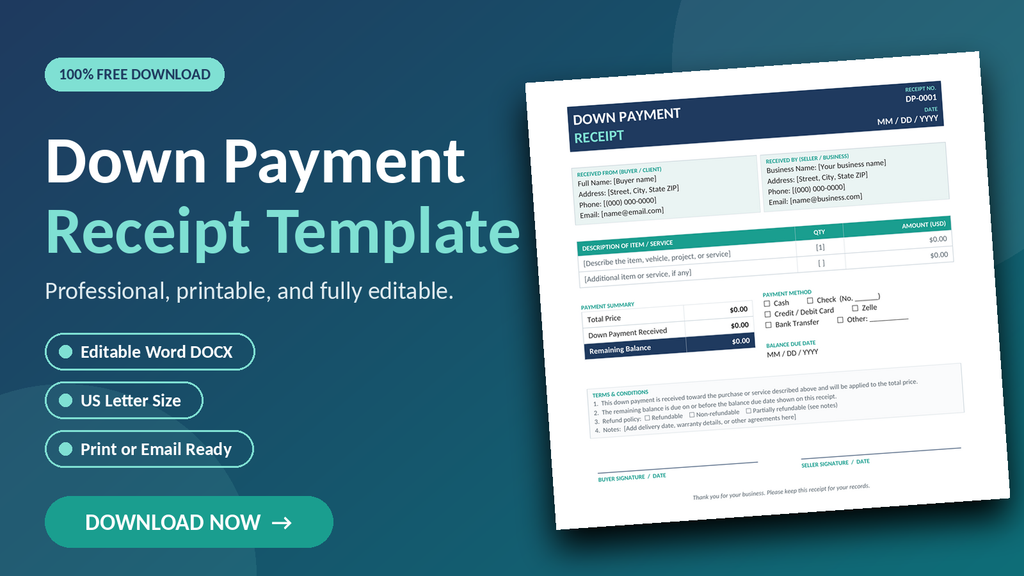
Our free down payment receipt template is designed for small business owners, freelancers, contractors, landlords, and private sellers. It is a clean, one-page US Letter document that opens in Microsoft Word, Google Docs, and most other word processors. Every field is editable, so you can adapt it to your business in minutes.
- Click the download button below to save the DOCX file to your computer.
- Open the file in Word and replace the bracketed placeholder text with your information.
- Enter the item or service description, total price, and down payment amount.
- Type the remaining balance and the date it is due.
- Check the payment method and refund policy boxes that apply.
- Print two copies for signatures, or save as a PDF and email it to your customer.
Tip: save a blank copy of the template, then use “Save As” for each new customer. That way your original stays clean, and you can number receipts in order, such as DP-0001, DP-0002, and so on.
What is Included in the Template
We built this template to cover everything a solid receipt should contain. Here is what you will find inside:
- Receipt number and date: A unique number at the top helps you track and file every transaction.
- Buyer and seller details: Separate sections for names, addresses, phone numbers, and email addresses.
- Item or service description: A table with quantity and amount columns for one or several items.
- Payment summary: Total price, down payment received, and remaining balance, clearly separated.
- Payment method options: Checkboxes for cash, check, card, Zelle, bank transfer, or other.
- Balance due date: A dedicated field so both parties know when the final payment is expected.
- Terms and conditions: Editable terms plus refundable, non-refundable, and partially refundable options.
- Signature lines: Space for buyer and seller to sign and date, making the receipt more credible.
The color scheme is professional but subtle, so the template prints well in black and white. You can also add your logo to the header or change the colors to match your brand. Because it is built with standard Word tables, the layout will not fall apart when you edit it.
To get the most from the template, always describe the item or service in detail, include model numbers, project scope, or delivery dates, and keep the amounts consistent with your invoice or contract. Clear details leave little room for misunderstanding.
A quick reminder: this template is a general-purpose tool and not legal advice. For large transactions such as real estate or vehicle sales, check your state’s requirements and consider having an attorney review your terms.
Create professional receipts in seconds with Receipt Generator Pro
Summary
A down payment receipt protects both sides of a deal. The buyer gets proof of what was paid, and the seller gets a clear record of what is still owed. Taking two minutes to complete a receipt can prevent weeks of confusion later. Keep a copy for your records and give one to your customer today.
Our free, editable Word template gives you a polished, professional document you can customize for any business. Download it now, fill in your details, and start collecting deposits with confidence.
Bookmark this page to grab the template whenever you need it, and share it with a colleague who could use it too.