
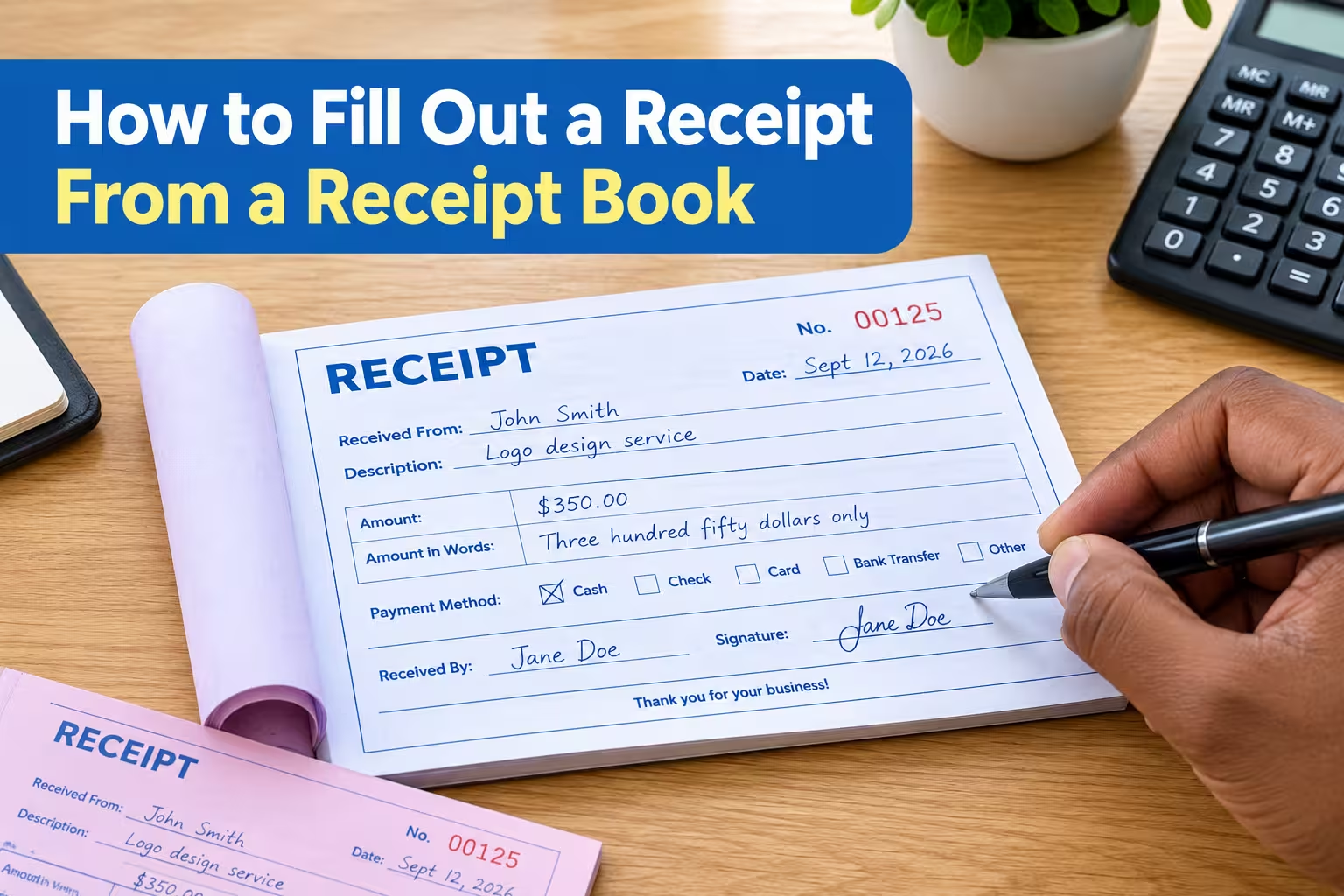
To fill out a receipt from a receipt book, write the receipt number and date, enter the customer’s details, describe what was purchased or paid for, record the amount received, indicate the payment method, and sign the receipt. Make sure every detail is accurate and give the original copy to the customer while keeping the duplicate for your records.
A handwritten receipt may look simple, but completing it correctly is important. A properly filled-out receipt provides the customer with proof of payment and gives the business a reliable record of the transaction.
What Is a Receipt Book?
A receipt book is a pad of pre-printed receipt forms used to record payments received from customers. Most receipt books contain duplicate or triplicate copies so the customer can receive one copy while the business keeps another.
How to Fill Out a Receipt From a Receipt Book
Follow these steps when completing a receipt by hand.
1. Write the Receipt Number
Start by checking the receipt number printed on the form. If the receipt book uses pre-numbered receipts, use the number already assigned to that receipt rather than creating your own.
Receipt numbers help you organize transactions and identify individual payments later. Avoid skipping numbers unless there is a legitimate reason, and keep any voided receipts for your records.
Example:
Receipt No.: 00125
If your receipt book has duplicate or carbon-copy pages, make sure the receipt number is visible on every applicable copy.
2. Enter the Date
Write the date the payment was received.
Use a clear date format that cannot easily be misunderstood. For example, writing September 12, 2026 is generally clearer than using only numbers such as 09/12/26.
The date should normally reflect when the payment was received, not necessarily when the goods or services were ordered.
3. Enter the Customer’s Name
Write the full name of the person or business making the payment.
For a business customer, use the company’s legal or commonly used business name when appropriate. If the receipt book has fields for an address, phone number, or other contact information, complete those fields when they are relevant to your recordkeeping requirements.
4. Describe What the Payment Was For
Use the description section to explain what the customer paid for.
Be specific enough that someone reviewing the receipt later can understand the transaction. Avoid vague descriptions such as “payment” when you can provide more useful information.
For example:
- Website design service
- 20 office chairs
- Monthly rent for September 2026
- Invoice #1048
- Plumbing repair
- School registration fee
If the receipt relates to a particular invoice, purchase order, or account, include the reference number when space allows.
5. Enter the Amount Paid
Write the amount the customer actually paid.
If the receipt has separate fields for numbers and words, complete both. Writing the amount in words can reduce the risk of someone altering the numerical amount.
Example:
Amount: $250.00
Amount in words: Two hundred fifty dollars only
Make sure the numerical amount and written amount match.
If the receipt book has separate fields for subtotal, tax, discount, and total, calculate each amount carefully before writing the final total.
6. Specify the Payment Method
Indicate how the customer paid.
Common payment methods include:
- Cash
- Check
- Credit card
- Debit card
- Bank transfer
- Mobile payment
- Money order
If the receipt includes a field for a check number or transaction reference, record it when appropriate.
For example:
Payment method: Bank transfer
Reference: TXN-458921
Do not record unnecessary sensitive payment information, such as a customer’s full card number.
7. Record Any Balance or Change
Some receipt books include fields for the amount received, amount due, and balance.
If the customer pays cash, calculate and record the change when applicable.
For example, if the total is $75 and the customer gives you $100, the change is $25.
If the customer has paid only part of the amount owed, clearly indicate that the receipt represents a partial payment and state the remaining balance if the form provides space for it.
8. Sign the Receipt
Sign the receipt if the form includes a signature field.
The signature identifies the person who received or authorized the payment. Depending on the business, you may also need to include the name or initials of the employee who handled the transaction.
9. Give the Customer Their Copy
Most receipt books are designed to create multiple copies.
After completing the receipt, separate the customer’s copy according to the receipt book’s design. Keep the business copy safely in the book or in your records.
Before handing it over, quickly check the receipt for errors in the date, amount, customer name, and payment description.
Example of a Filled-Out Receipt
Here is a simple example of what a completed receipt might look like:
| Receipt Field | Example |
|---|---|
| Receipt No. | 00125 |
| Date | September 12, 2026 |
| Received From | John Smith |
| Description | Logo design service |
| Amount | $350.00 |
| Amount in Words | Three hundred fifty dollars only |
| Payment Method | Cash |
| Balance Due | $0.00 |
| Received By | Jane Doe |
| Signature | Jane Doe |
The exact fields will depend on the receipt book you are using. If a field does not apply to the transaction, follow your business’s recordkeeping procedure rather than leaving important information unclear.
Common Mistakes to Avoid When Filling Out a Receipt
Even simple receipts can cause problems when important information is missing or incorrect.
Using the Wrong Date
Always verify the transaction date before completing the receipt. An incorrect date can make reconciliation and recordkeeping more difficult.
Writing an Unclear Amount
Write numbers clearly and make sure the amount in words matches the numerical amount. This is particularly important for handwritten receipts.
Leaving the Description Too Vague
A description such as “services” does not provide much useful information. Identify the product, service, invoice, rental period, or other relevant transaction details.
Forgetting the Payment Method
Indicating whether the customer paid by cash, check, card, bank transfer, or another method makes the receipt more useful for accounting and reconciliation.
Losing the Business Copy
The duplicate copy is important because it provides evidence of the transaction. Store receipt books in an organized and secure location after they have been used.
Skipping Receipt Numbers
Sequential receipt numbers make it easier to identify missing, voided, or incorrectly recorded transactions. If a receipt is voided, retain it and document the reason according to your recordkeeping procedures.
Create professional receipts in seconds with Receipt Generator Pro
Also see: