
You sent the invoice on March 3. The terms say Net 30. So when exactly is the money due, and what happens if the client pays on day 10 instead?
Getting this wrong costs real money: missed discounts, late fees you forgot to charge, and cash flow gaps you did not see coming. The fastest fix is a payment terms calculator, and you will find a free one right below. If you want to understand the math behind it, the step-by-step guide that follows shows you how to calculate payment terms by hand.
Free Payment Terms Calculator
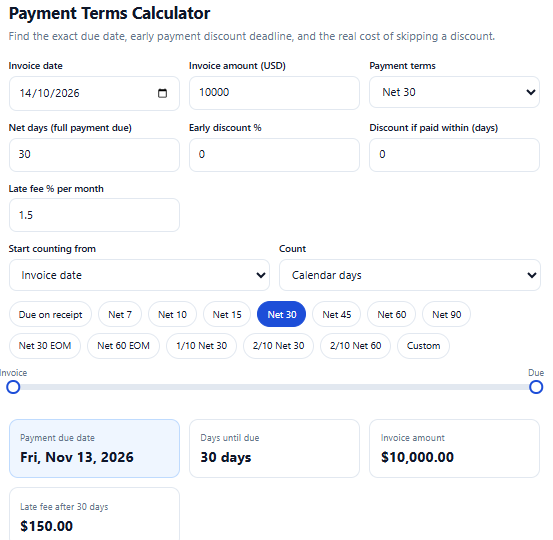
Enter your invoice date, amount, and terms. The payment terms calculator returns the due date, the early payment discount deadline, how much you save, and the true annualized cost of skipping a discount.
Payment Terms Calculator
Find the exact due date, early payment discount deadline, and the real cost of skipping a discount.
Prefer to learn the method first? Keep reading.
What Are Payment Terms?
Payment terms are the conditions in an invoice or contract that say when a customer must pay and whether they get a discount for paying early. They usually include three parts:
- A due date rule, such as Net 30 (full payment due 30 days after the start date).
- An optional early payment discount, such as 2% off if paid within 10 days.
- An optional late penalty, such as 1.5% per month on overdue balances.
Clear terms protect both sides. The seller gets predictable cash flow, and the buyer knows exactly when to pay.
Common Payment Terms at a Glance
| Term | What it means | Typical use |
|---|---|---|
| Due on receipt | Payment due immediately | Small jobs, consumers |
| Net 7 / Net 15 | Due 7 or 15 days after the start date | Freelancers, short projects |
| Net 30 | Due 30 days after the start date | The most common B2B term in the US |
| Net 60 / Net 90 | Due 60 or 90 days after the start date | Large buyers, enterprise contracts |
| Net 30 EOM | Due 30 days after the end of the invoice month | Monthly billing cycles |
| 2/10 Net 30 | 2% discount if paid in 10 days, otherwise full amount in 30 |
How to Calculate Payment Terms: 6 Steps
Follow these steps, or let the payment terms calculator above do them in one click.
Step 1: Identify the start date
The clock does not always start on the invoice date. Check your contract for which of these applies:
- Invoice date (the default for most small businesses)
- Delivery or receipt date (common in goods and logistics)
- End of the invoice month (EOM terms)
If the contract is silent, the invoice date is the safest assumption, but state it explicitly on every invoice.
Step 2: Read the term code
Break the term into its parts:
- Net 30 = full payment due in 30 days.
- 2/10 Net 30 = discount % / discount days / net days. That is a 2% discount if paid within 10 days, full payment within 30.
Step 3: Add the net days to the start date
This is the core formula:
Due date = start date + net days
Example: invoice dated March 3, Net 30. March has 31 days, so 28 days remain after March 3 (to March 31). Add 2 more days into April and the due date is April 2.
For EOM terms, move the start date to the last day of the invoice month first. A Net 30 EOM invoice dated March 3 starts counting on March 31, so it is due April 30.
Step 4: Decide calendar days or business days
Unless your contract says otherwise, Net terms use calendar days, which include weekends. Some contracts specify business days, which skip Saturdays and Sundays. A Net 10 term in business days lands two calendar weeks out, not ten days out.
Note that many calculators skip weekends but not US federal holidays, so check any holidays manually if the contract requires business days.
Step 5: Calculate the early payment discount
If the terms include a discount:
- Discount deadline = start date + discount days
- Discount amount = invoice amount × discount %
- Amount due if paid early = invoice amount − discount amount
Example: a $10,000 invoice on 2/10 Net 30. Pay within 10 days and you owe $9,800. Pay on day 11 through 30 and you owe the full $10,000.
Step 6: Check the real cost of skipping the discount
This is the step most guides skip. A 2% discount looks small, but you are effectively borrowing money from the seller for the extra 20 days (day 10 to day 30) if you decline it. The annualized cost is:
Annualized rate = discount ÷ (100 − discount) × 365 ÷ (net days − discount days)
For 2/10 Net 30: 2 ÷ 98 × 365 ÷ 20 = about 37.2% per year.
If your business can borrow for less than that, taking the discount is almost always the smarter move. If you are the seller, you are paying roughly that rate to get cash 20 days sooner, so make sure you actually need the cash.
Worked Examples
Example 1: Net 30 from invoice date Invoice date: June 15. Due date: July 15.
Example 2: Net 60 Invoice date: January 10. Due date: March 11 (January has 31 days, February 28 in a non-leap year).
Example 3: Net 30 EOM Invoice date: September 12. Start counting from September 30. Due date: October 30.
Example 4: 1/10 Net 30 on $5,000 Paid by day 10: discount $50, pay $4,950. Annualized cost of skipping: 1 ÷ 99 × 365 ÷ 20 = about 18.4%.
How Our Payment Terms Calculator Compares
We reviewed several of the pages that rank for these searches. Most do the basics well: they handle Net 30 and 2/10 Net 30 and return a due date. The gaps are in what happens after the due date.
| Feature | Typical ranking pages | Our payment terms calculator |
|---|---|---|
| Net 7 to Net 90 presets | Yes | Yes |
| 2/10 Net 30 discount deadline and amount | Yes | Yes |
| EOM start option | Some | Yes |
| Business-day counting | Some | Yes |
| Annualized cost of skipping the discount | Rare, usually a separate tool | Built in |
| Late fee estimate | Rare | Built in |
| Visual timeline | Rare | Yes |
| US dollar defaults, no signup | Mixed | Yes |
Common Mistakes When You Calculate Payment Terms
- Counting from the wrong date. Invoice date and delivery date can differ by weeks.
- Forgetting that EOM shifts the start date. Net 30 EOM is not the same as Net 30.
- Ignoring weekends. A due date that lands on Saturday often gets paid the following Monday or Tuesday.
- Treating the discount as a small perk. A 2% discount is worth about 37% annualized on 2/10 Net 30.
- Not stating late fees on the invoice. If the fee is not in the agreement, it is hard to enforce.
- Mixing up discount days and net days. In 2/10 Net 30, the 10 is the discount window and the 30 is the final due date.
Tips to Get Paid Faster
- Put the exact due date, not just “Net 30”, on every invoice.
- Offer a modest early payment discount only if your margin can absorb it.
- Send invoices the day work is completed.
- Include a late fee clause and a payment link.
- Follow up three to five days before the due date, not after it.
Frequently Asked Questions
What does Net 30 mean?
Net 30 means the full invoice amount is due 30 days after the start date, which is usually the invoice date.
How do I calculate a Net 30 due date?
Add 30 calendar days to the invoice date. Or enter the invoice date in the payment terms calculator above and read the result.
What does 2/10 Net 30 mean?
The buyer gets a 2% discount for paying within 10 days. Otherwise, the full amount is due within 30 days.
What is the difference between Net 30 and Net 30 EOM?
Net 30 counts from the invoice date. Net 30 EOM counts from the last day of the invoice month, so the due date is usually later.
Do payment terms include weekends?
Usually yes. Net terms count calendar days unless the contract specifies business days.
Can I negotiate payment terms?
Yes. Payment terms are a commercial agreement. Buyers often ask for longer terms, and sellers can offer discounts for faster payment.
Is a late fee legal?
In the US, late fees are generally allowed if they are agreed to in advance and are reasonable, but rules vary by state and by contract type. Check your state’s rules or ask an attorney. This guide is general information, not legal or financial advice.
Are Net 30 terms required by law?
No. For most private B2B invoices, the parties set payment terms by agreement. Federal government contracts follow separate prompt payment rules.
Summary
To calculate payment terms, identify the start date, read the term code, add the net days, decide between calendar and business days, then work out any early payment discount and its annualized cost. The payment terms calculator on this page does all six steps instantly, so you can confirm due dates, plan cash flow, and decide whether a discount is worth taking.
Bookmark the payment terms calculator and use it before you send your next invoice.