
Download a free invoice tracker Google Sheets template. Track invoices, due dates, payments, and overdue balances in one place. Works in Excel too.
What is an Invoice Tracker Google Sheets?
An invoice tracker in Google Sheets is a spreadsheet that logs every invoice you send, when it’s due, and whether it’s been paid. You can download the free template below, make your own copy, and start tracking in minutes.
It calculates balances and flags overdue invoices for you. No formulas to write and no software to buy.
Download Invoice Tracker Google Sheets
When the Google Sheets link opens, click Make a copy. The copy goes to your Google Drive, where you can edit it freely.
What Is Included in the Invoice Tracker Google Sheets Template
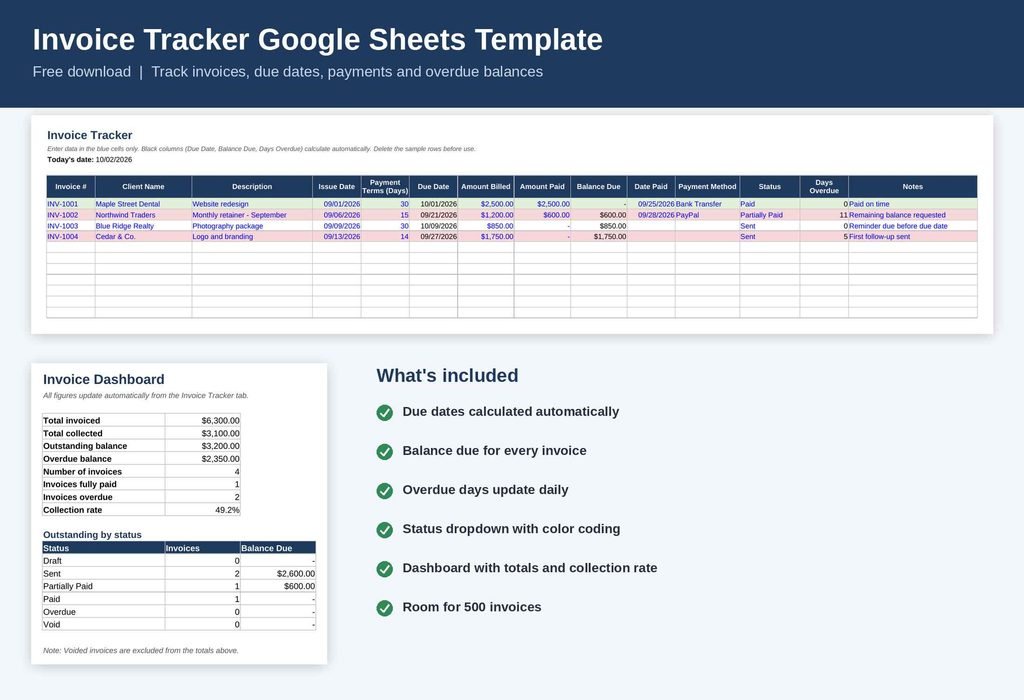
The template has two tabs: an invoice log and a dashboard. Both work together, so you only enter data once.
Invoice Tracker tab
- Invoice details: invoice number, client name, description, and issue date.
- Due date: calculated from the issue date plus your payment terms.
- Payment tracking: amount billed, amount paid, date paid, and payment method.
- Balance due: calculated automatically for every invoice.
- Days overdue: updates daily based on today’s date.
- Status dropdown: Draft, Sent, Partially Paid, Paid, Overdue, or Void.
- Color coding: paid invoices turn green, and unpaid invoices past their due date turn red.
- Capacity: room for 500 invoices, with filters on every column.
Dashboard tab
- Total invoiced, total collected, and outstanding balance.
- Overdue balance and number of overdue invoices.
- Collection rate as a percentage.
- A breakdown of invoices and balances by status.
How to Use the Invoice Tracker
- Make a copy of the template and delete the four sample rows.
- Enter each new invoice in the blue cells.
- Update the Amount Paid, Date Paid, and Status when a payment arrives.
- Check the Dashboard tab weekly to see who owes you money.
Only the blue cells need typing. Everything in black is a formula, so leave those alone.
Also see: Excel Receipt Tracker Template
FAQs
Is there a free invoice tracker template for Google Sheets?
Yes. The template on this page is free to download and use. You can edit it, add columns, and use it for personal or business invoicing.
How do I track invoices in Google Sheets?
Create a row for each invoice with its number, client, amount, and due date. Then add columns for amount paid, balance due, and status. This template already includes all of them.
How do I know which invoices are overdue?
The Days Overdue column shows how many days an unpaid invoice is past its due date. Overdue rows also turn red, so they stand out when you scroll.
Can I use this template in Excel?
Yes. The Excel version has the same tabs, formulas, dropdowns, and color rules. You can also upload the file to Google Drive and open it in Google Sheets.
Does it handle partial payments?
Yes. Enter the amount received in Amount Paid, and the balance due updates automatically. Set the status to Partially Paid until the invoice is settled.
Is an invoice tracker the same as an invoice generator?
No. A tracker records and monitors invoices after you’ve created them. If you need to create the invoice itself, use an invoice template or an invoice generator, then log it here.
Summary
An invoice tracker keeps your billing organized, shows what you’re owed, and makes late payments easy to spot. This free Google Sheets template handles due dates, partial payments, overdue alerts, and a summary dashboard.
Download it, make a copy, and enter your first invoice today.
Also see: Free Invoice Generator | Invoice Calendar | Free Invoice Tracker Google Sheets Template